Can an AI Agent Be Busy but Useless?

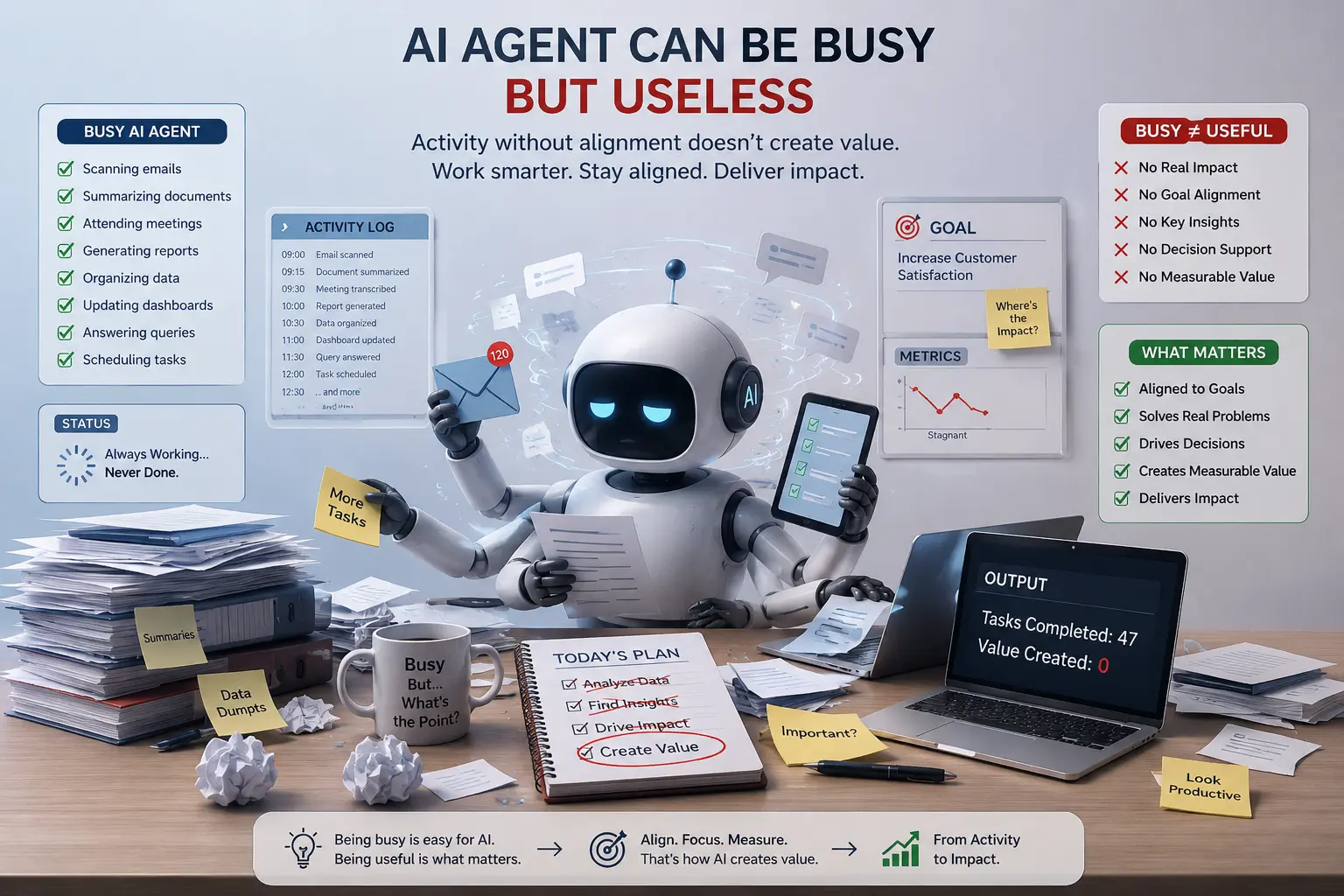
"Companies that succeed with AI aren't the ones automating the most tasks. They automate the right tasks and measure the right metrics."
Table of Contents
- What Does "Busy but Useless" Actually Mean?
- Activity Metrics vs. Outcome Metrics
- Why AI Agents Become Busy but Useless: Root Causes
- Step-by-Step Framework: Diagnose and Fix
- Real-World Case Study
- Warning Signs Your AI Agent Might Be Busy but Not Productive
- How to Build AI Agents That Are Actually Useful
- Frequently Asked Questions
- Conclusion: Busy Is Not the Same as Useful
- How Gezora.ai Turns Busy AI Agents Into Useful Ones
Step into almost any operations or customer support team nowadays and you'll likely encounter an AI agent working in the background to respond to tickets, schedule tasks, generate reports, or sort out requests. In theory, it looks like a productivity revolution. The dashboards show numerous green figures: thousands of tasks done, hundreds of interactions managed, dozens of processes automated. Yet an increasing number of managers are asking an uncomfortable question now trending on LinkedIn, in AI discussions, and in corporate strategy sessions worldwide: can an AI agent be busy but unproductive?
This isn't just an academic question anymore. As organizations scramble to integrate AI agents, AI automation, and autonomous processes, there is a mounting number of cases where "activity" and "value" do not correspond. An AI agent might execute thousands of API calls and produce unlimited output while moving no key business metric at all. This article outlines what causes this problem, introduces a step-by-step approach, provides a case study, and considers the questions around AI agent productivity, AI ROI, and intelligent automation for 2026.
1. What Does "Busy but Useless" Actually Mean for an AI Agent?
A busy but useless AI agent uses computing power, time, and money executing tasks that appear productive but generate no tangible value for the company. It's analogous to an employee who replies to fifty emails daily but never closes a sale, or a factory machine that runs continuously without producing anything.
This matters because most AI agent dashboards are built from activity metrics rather than outcome metrics. Typical activity metrics include:
- Number of tasks/tickets handled.
- Number of API calls/tool invocations.
- Latency or response time.
- Number of tokens/messages generated.
- Availability and uptime percentages.
None of these tells you whether the AI agent solved the customer's problem, lowered cost, generated revenue, or made any decision better than before. That is the difference between being busy and being productive, and it's where most failed AI agent deployments live.
2. Activity Metrics vs. Outcome Metrics
The reason an AI agent can seem productive while generating little value is best explained by separating the two kinds of measurement companies use.
| Activity Metric (Looks Busy) | Outcome Metric (Is Actually Useful) |
|---|---|
| Tickets handled per hour | First-contact resolution rate |
| Number of automated workflows triggered | Reduction in manual rework or escalations |
| Emails or messages sent | Conversion rate or customer retention |
| Reports generated | Decisions made faster or more accurately because of the report |
| AI agent uptime | Net cost savings versus a human-only process |
3. Why AI Agents Become Busy but Useless: The Root Causes
To solve the problem, first understand its causes. Across AI agent deployments in customer service, sales, logistics, and back-office automation, a few patterns come up repeatedly.
- Vague or activity-based goals: Many agents are programmed "to automate customer responses" or "process requests faster." These are activity goals, not outcome goals. Without a specific definition of success in revenue, cost, or satisfaction terms, the agent merely maximizes activity.
- No memory or context across tasks: A system that can't recall past engagements, customer history, or prior decisions repeats actions, asks the same questions, and gives generic answers. It looks active because it's continuously responding, but each engagement starts from scratch, so no value compounds.
- Tool misuse and over-automation: Agents given too many tools without proper decision rules invoke the wrong tool, loop actions, or trigger unnecessary workflows. They generate high log volume that masks the fact that the agent is simply flailing.
- Missing human-in-the-loop checkpoints: With no mechanism to involve humans when needed, the result is repetitive cycles or low-confidence decisions. Either way, the process produces actions while undermining quality and trust.
- Misaligned incentives: When a team is rewarded for how much automation ships rather than the value it creates, the whole AI program drifts toward busyness. This is as much a leadership and metrics issue as a technical one.
- No feedback loop for continuous learning: Agents with no structured signal about whether their actions were right or wrong never improve. They repeat the same mistakes indefinitely, a problem far bigger than humans erring occasionally.
4. Step-by-Step Framework: How to Diagnose and Fix a Busy-but-Useless AI Agent
If you doubt the utility of an AI agent, assistant, or automation tool despite all its busyness, this framework helps you analyze the problem and rebuild a valuable one.
Step 1: Audit Activity Logs Against Business Outcomes
Retrieve the agent's activity logs from the last 30 to 90 days and compare them to the metric you actually care about, issue resolution, revenue recovery, or hours saved. If activity rises while the performance metric stays flat or drops, you've found your inefficient agent.
Step 2: Map the Agent's End-to-End Decision Loop
Detail every step the agent performs from input to output, including all tool invocations, API queries, and decision paths. This usually surfaces redundant steps, circular reasoning, and unproductive tool calls.
Step 3: Define Outcome-Based KPIs Before Anything Else
Drop activity-based success measures and introduce outcome-based KPIs: cost of resolution per incident, proportion of incidents resolved without human escalation, improvement in customer satisfaction, and revenue driven per agent interaction.
Step 4: Run an "Effort Without Effect" Test
Choose 50-100 tasks the agent already completed and review them manually. For each, ask: did the action change anything for the business or customer? If most tasks pass the activity test but fail the effect test, the agent needs a redesign.
Step 5: Add Human-in-the-Loop Checkpoints at the Right Moments
Identify the 10-20 percent of cases with the lowest confidence or highest stakes and route those for human review. That alone usually handles the worst "busy work" while still automating the majority.
Step 6: Rebuild Context and Memory Into the Agent's Architecture
Ensure the agent can access structured memory of past interactions, customer information, and results. An agent that remembers is far more productive than one that doesn't.
Step 7: Establish a Continuous Feedback and Monitoring Loop
Set up a regular review, weekly or biweekly, where real performance feeds back into prompts, permissions, and escalation policies. Working AI agents are not set-and-forget; they're regularly tuned to actual business results.
5. Real-World Case Study: A Busy AI Agent That Wasn't Actually Helping
To make this concrete, consider an example typical of what mid-sized online retailers and logistics firms experience when they deploy AI agents without an outcome-driven approach.
The Situation
A mid-sized online retailer uses an AI agent to answer customer queries about orders and shipping. In the first month the results look great: the agent handles almost 70 percent of queries without human intervention, and response time drops from several hours to under a minute.
The Hidden Problem
Despite the progress, customer satisfaction quietly fell over the same period while refund requests rose. A deeper analysis revealed why:
- Although issues were marked "resolved," the customer's problem often wasn't fixed, only the chat was closed.
- With no memory of previous interactions, returning customers were asked to describe their problem from scratch.
- The bot had no escalation process; when it couldn't answer, it apologized and ended the chat.
- The sole evaluation metric was "chats closed", nothing else.
So the bot was very busy, and also largely useless to customers much of the time.
The Fix
Using the step-by-step approach, the company made four specific changes:
- Changed the KPI from "closed chats" to "customer-confirmed resolution."
- Enabled persistent memory of the customer's previous interactions.
- Added automatic escalation for any chat with two or more unresolved follow-up questions.
- Implemented weekly checks of a random selection of closed chats.
The Result
Within two months, first-contact resolution improved noticeably, refund-related complaints dropped, and customer satisfaction not only recovered but surpassed its pre-chatbot record. Notably, the number of chats the bot handled actually declined, because cases needing human intervention were no longer being falsely marked resolved.
6. Warning Signs Your AI Agent Might Be Busy but Not Productive
When assessing an existing AI agent, chatbot, or automation process, watch for these red flags of an unproductive agent and negative AI ROI:
- High task volume with no movement in business KPIs.
- Customers or employees asking the agent the same question repeatedly.
- Frequent "resolved" tags without verifying the problem was actually fixed.
- No established definition of success for the agent.
- No option for human intervention on uncertain or risky decisions.
- No retention of past conversations, leading to repetition and clichés.
- Management reporting AI usage statistics rather than business value.
Any organization searching "AI agent productivity," "AI ROI," "AI automation failure," "why is my AI agent not working," or "busy but useless AI" is highly likely to face one or several of these.
7. How to Build AI Agents That Are Actually Useful, Not Just Active
The challenge is less about choosing the AI model than designing the whole ecosystem around the agent. A few best practices clearly separate effective agents from their busy, useless counterparts:
- Always start with the business outcome and design the workflow backward into the agent, rather than automating the current process and hoping outcomes improve.
- Treat memory and context as core infrastructure, not an optional add-on.
- Incorporate human-in-the-loop checkpoints from the start of development, not after something goes wrong.
- Use outcome-oriented KPIs evaluated by business stakeholders, not only by engineers.
- Conduct periodic manual audits of the agent's decision-making on a sample of cases, because dashboards can't reveal silent failures.
- Give the agent a clear, narrow scope of actions rather than unlimited freedom.
Organizations that follow this approach deploy agents that genuinely reduce cost, raise customer satisfaction, and free human teams for high-value work, instead of agents that only produce impressive-looking activity reports.
8. Frequently Asked Questions About Busy but Useless AI Agents
Why does my AI agent look productive but not improve results?
Usually because it's evaluated on performance metrics like task completion and response time rather than outcome metrics like resolution quality, cost savings, or customer satisfaction. The agent optimizes for its evaluation criteria, so if those criteria are wrong, its behavior will be too.
Is this problem unique to chatbots and customer support agents?
Not at all. The same "busy but useless" dynamic shows up in sales outreach agents that send high volumes of messages without conversions, internal automation agents that fire workflows without saving time, and data agents that produce reports no one uses. Any agent evaluated on volume rather than efficacy is at risk.
How quickly can a business fix a busy-but-useless AI agent?
Organizations implementing the seven steps above tend to see significant improvement in four to eight weeks, because there's no need to change the core AI engine, only to redefine KPIs, add escalation logic, and introduce memory.
What is the single most important first step?
Replace activity-based KPIs with outcome-based KPIs. Every other fix, memory, human escalation, becomes easier once that's right.
9. Conclusion: Busy Is Not the Same as Useful
Whether AI can be "busy but useless" is no longer hypothetical. It's one of the key issues in enterprise AI implementation in 2026 as more firms scale AI agents beyond successful pilots. The companies that succeed aren't those automating as many tasks as possible, but those automating the right tasks and measuring the right metrics.
If your team is auditing, building, or fixing an AI agent that feels occupied but not actually valuable, the framework here is a good starting point: audit activity versus output, map the decision cycle, define outcome-focused KPIs, test for effort without effect, add the necessary human gateways, and restore memory to the system.
10. How Gezora.ai Helps Industries Turn Busy AI Agents Into Genuinely Useful Ones
This is precisely the void Gezora.ai fills for enterprises. Instead of treating AI integration as a one-time act of deploying a chatbot or automation script, Gezora.ai collaborates with businesses to build AI agents and workflow systems that measure business outcomes from their very first interaction.
Across e-commerce, logistics, healthcare administration, financial services, professional services, and more, Gezora.ai works with companies systematically:
- Discovery first: Gezora.ai starts by discovering what processes a company runs today and which specific pain points AI can actually relieve, rather than automating for its own sake.
- Outcome-based design: Every Gezora.ai agent ships with a business KPI attached, faster resolution times, lower costs, higher conversions, or better data accuracy.
- Context and memory architecture: Gezora.ai connects each agent to CRM and other data sources so it understands what it's doing instead of generating generic answers.
- Human-in-the-loop by design: Each agent routes complex cases to the right humans rather than silently failing on them.
- Continuous performance improvement: After deployment, Gezora.ai keeps analyzing performance and tunes prompts and escalation rules based on real outcome data.
The difference is integrating AI so that effectiveness and productivity are connected. By partnering with Gezora.ai, businesses deploy AI agents that aren't just productive on a dashboard but genuinely save cost and time for customers and the organization alike.
Any business unsure whether its AI agents are actually effective can benefit from a conversation with Gezora.ai. Visit gezora.ai to learn more.