
AI project management software: what it can predict and what to ask a vendor
What AI project management software can read, what it can predict, and the questions to put to a vendor before you buy.
Sufi Inam Ul Hassan
AI Engineer13 minute read
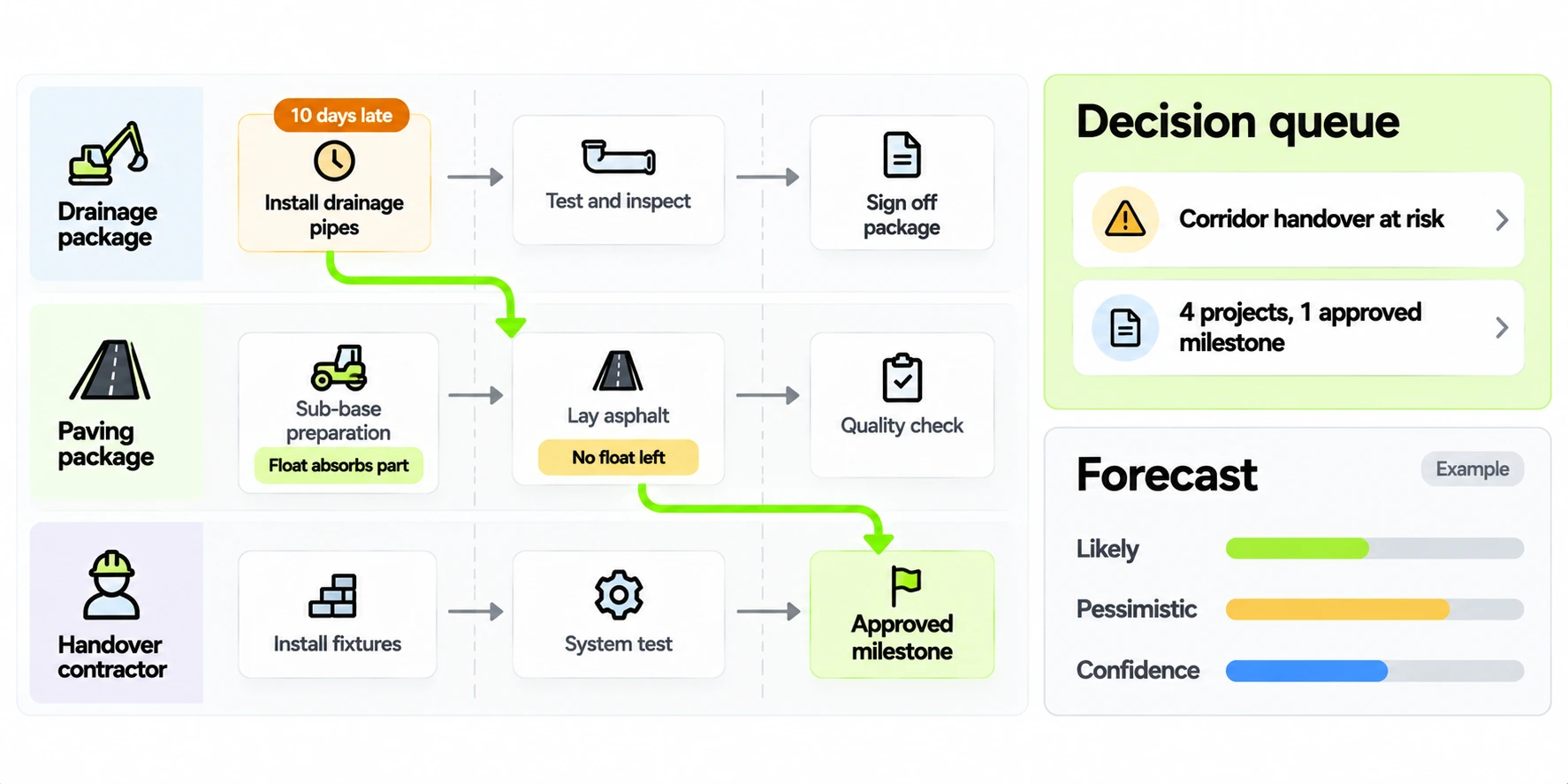
Project management software holds the plan. It rarely knows what happened on site today. Say a project manager writes a note that a trench is ten days late. It lands in an inbox, and the schedule stays green until somebody finds time to update it. Meanwhile a contractor on another project has lost the access road they were counting on, and nobody has told them.
AI project management software tries to close that gap: it reads the updates people already write, checks them against the plan, works out who else the delay touches, and tells those people at the same time as the program office. Done badly, it is a dashboard with a chat window.
Where ordinary project management software stops
Gantt charts, task boards and resource planners are good at holding a plan: tasks, dates, owners and dependencies. They're only as current as the last person who updated them, and updating them is a chore, so in practice the schedule lags the work. For a handful of independent projects that's tolerable, and ordinary software is enough.
It stops being tolerable when projects interact through shared contractors, shared materials or shared milestones. A slip in one place spreads, and the people who feel it are on a different project from the one that slipped. A dashboard can show every project's status once somebody has assembled it, which is the problem: it reports after the fact. The useful question is "who does this change reach, and when", and a status page doesn't answer it.
What AI adds to project management
AI powered project management software does five separate jobs, and most of them need no language model.
Reading the daily update
Project managers write in plain language: "trench work slipped, we finish ten days later than plan, waiting on the road closure permit." A language model is good at turning that into structured fields (progress, blockers, approvals, the task it belongs to), and it can ask a follow up when something is missing, such as which of two open permits is the one holding things up.
Checking it against the baseline
The system compares what was reported with what was planned: the finish date, progress against the planned curve, open approvals. This is arithmetic and needs no AI. It tells you whether a project is slipping or only noisy.
Following the dependency chain
Once a task has moved, the system walks forward through every task that depends on it. Some of the delay is absorbed by float, the time a task can slip before it pushes back the next one; where no float is left, the delay passes straight on. This is critical path logic, in use since the 1950s, and it's deterministic. A language model shouldn't do it, because a language model can be persuasive and wrong about arithmetic. The sensible split is a model for reading text and plain code for everything that involves dates.
Deciding who needs to know
Not every slip deserves an executive's attention. A materiality score weighs how much float remains, how critical the affected work is, how many projects are touched and what the delay costs, against a threshold your program office sets. Slips below the line stay in the project view; slips above it go on a decision list.
Forecasting how long it will run
From comparable past cases on the same program, the system estimates how long the delay is likely to last. A good forecast gives a central estimate and a pessimistic one, and states how much history supports it.
What a daily update looks like
The input is the part people worry about, so it's worth showing. A weak update reads: "Site going OK, some delays." It tells the program nothing. A usable one reads: "Trench work on the north corridor slipped. We finish ten days later than plan. Waiting on the road closure permit and the tie in permit; the closure is the one holding us." It has progress, a blocker, two approvals and a hint about which approval binds.
The system's first job is to turn the second kind into fields: progress against the plan, the blocker in the words used on site, the open approvals, and the task it belongs to. When the update doesn't say which task, a good system asks one targeted question in the same channel, such as "Is this the trunk sewer section or the lateral?", and doesn't bounce the message back. It keeps the project manager's original wording next to the extracted fields, so anyone can check what the model understood and what the person wrote.
Keep the required fields few. Progress, blockers, approvals and a task reference are enough to feed everything downstream, and every extra field is a reason for a busy project manager to skip the update.
A worked example
Take a construction program with several contractors working along one corridor. The project manager for a drainage package reports that trench work has slipped ten days, held up by a road closure approval.
The update is logged against the specific trench task, with the raw wording kept beside the structured version so nothing is lost. The new finish date is compared with the approved baseline, and the project is flagged as slipping. Then the dependencies are walked. The first hop, from the drainage work to road paving, has some float, which absorbs part of the delay but not all of it. The second hop, from one paving task to the next, has no float, so whatever delay reaches it passes straight on. The third hop reaches a handover milestone that was already approved, and after that the chain crosses into work owned by another contractor.
Now the system can say something specific: this ten day slip reaches several projects and one approved milestone, and the binding constraint is a permit that has been open for six days. That goes on a decision list for the person who owns the program, ranked by materiality, with costed options and a recommendation. This example is invented and the numbers are illustrative. The steps are the ones the system takes.
What a good decision list entry contains
The output that counts is the decision list, so it should be written for the person who has to act. A good entry names the root cause in plain language, which is the update the chain started from. It lists who the problem touches, meaning every project the walk reached. It sets out a few options with their costs and recommends one, with the reasoning shown so that the executive can disagree with it. It says how confident the system is and what that confidence rests on, and it carries an owner and a date by which a decision is needed. If an entry can't be read in under a minute by a busy executive, it will be skimmed, and a decision list that gets skimmed prompts few decisions.
Why not paste the schedule into a chatbot
For a one off look at a small plan, pasting it in works fine. At program scale it runs into four problems. The schedule may not fit in the model's context, and a general chatbot has no persistent picture of the program, so it rebuilds one from whatever you pasted each time. Without a code tool it makes arithmetic mistakes that are easy to miss, and dates are exactly where those mistakes hurt. It has no idea who is allowed to see which contractor's figures. And it leaves no trail: next month you can't show how it reached a conclusion, because the conclusion lived in a chat window.
A purpose built system keeps the plan as a structured graph, does the date logic in plain code, scopes access by identity, and records what it did. The language model still earns its place, but in one narrow job: reading the messy text that people write in their updates.
Questions to ask any AI project management software vendor
- Does it keep the raw update beside the structured version, so you can see what the model understood?
- Is the dependency graph declared by your controller or guessed by the model? Guessed dependencies produce confident but wrong forecasts.
- How does it find a dependency nobody declared? It can't; the walk only follows declared links, so ask who keeps the graph honest.
- Which parts are done by a language model and which by plain code? Anything involving dates and arithmetic should be plain code.
- Does every forecast come with a confidence level and the past cases it drew on?
- Who sets the threshold for what reaches the executive list, and can you change it?
- What happens when the model is unsure about an update? It should ask a question.
- Can you replay how a past conclusion was reached, step by step?
- Which channels does it accept updates from, such as chat, a form or a voice note? Project managers won't adopt yet another form.
- How is access scoped? Contractors shouldn't see each other's commercial detail.
How to read a forecast
A useful forecast gives a likely duration and a pessimistic one, says how confident it is, and shows the past cases it was built from. If it was built from three comparable cases, that is thin, and the confidence should say so. Treat a single number with no stated basis as a guess.
Scenario runs, where you ask what happens if the permit clears this week, are simulations and should be labeled that way. They compare options; which one happens still depends on the permit. Apply the same scrutiny to AI project risk management software: a score for risk in the abstract tells you little, while consequence and reach tell you what to do.
Who sees what
A program with several contractors has a sensitivity problem: the same data that makes the system useful would let one contractor see another's commercial detail. Check that access limits apply to the answers the system gives as well as the screens it shows. A contractor's project manager should see their own work and the dependencies that touch it, but not another firm's rates or claims. The system should run each action under a named identity, so there's a record of what acted on whose behalf, and executives should see a ranked decision list without needing access to every project underneath.
Ask about the audit trail too. Can you trace a flag on the executive desk back to the update that caused it, the version of the rules in force that day, and the decision that followed? If the system can't answer that, it can't settle a dispute about who knew what and when, which is exactly when you'll need it.
Connecting it to what people already use
People won't move their daily reporting to a new tool, so the system has to meet them where they already report: a chat message, a short form, a voice note. A well designed one accepts all three and normalizes them into the same fields. On the other side, it needs the plan. That means loading the approved baseline from the scheduling tool the program already uses and the dependency graph the controller maintains, and refreshing both when the plan is rebaselined.
Expect the dependency graph to be the real work. Many programs record dependencies inside each project and few across them, because nobody was asked to. The controller will need to declare the links that cross project and contractor boundaries, such as a shared access road, a common permit or a milestone that two contractors both feed. It's slow the first time, and it's also the most useful thing the exercise produces, since the graph is what lets a ten day slip be followed to the people it reaches.
Rolling it out with project managers
The daily update feeds everything else, so whether project managers write it decides whether the system works. Start with the project managers who already write good updates, since their early results tend to persuade the rest of the team. Show project managers what they get back: early warning that a blocker is about to reach someone else is what makes the extra effort feel worthwhile. Ownership stays clear throughout: the controller owns the schedule and the dependency graph, and the system forecasts consequences from them.
A pilot on one program
A sensible pilot is a single program with several contractors and enough interdependence that a slip in one place plausibly affects another. Run it in four phases. (The timings are illustrative.)
In weeks one and two, load the baseline, the dependency graph and past delay records, and have the controller review the graph, including the links that cross projects. Agree the daily update format with the project managers and test it with one or two of them.
In weeks three to six, run in parallel. Project managers send updates as usual, the system produces its flags and its decision list, and the existing weekly reporting carries on untouched. Nothing the system says is acted on automatically.
In weeks seven and eight, compare. For each delay that surfaced in the weekly meeting, check when the system first flagged it and whether it identified the right downstream impact. Count the flags that turned out to be noise. Ask the controller whether the graph was right, and ask the project managers whether the updates took longer than before.
Then decide. If the system gave meaningful early warning and the noise was tolerable, adjust the materiality threshold, add the next program, and keep the parallel run going until people trust the list. If it didn't, the comparison tells you why: a thin graph, vague updates, or a threshold set too low.
Signs it's paying off
Early warning is the main sign. In an illustrative case, a delay that used to surface in the weekly meeting two weeks after the update that caused it now reaches the affected contractors within a day. The weekly meeting spends less time finding out what happened and more time deciding what to do. The decision queue gets shorter because items get resolved while options still exist. Project managers keep sending updates, which is the best evidence that they see the point. And the controller trusts the graph enough to use it in conversations with contractors, which only happens after it has been right a few times in public.
When it isn't worth it
It isn't worth it for every portfolio. If your projects are independent, with separate contractors, separate materials and no shared milestones, a slip in one tells you nothing about another, and ordinary software with a decent weekly review is enough. The same goes when updates aren't being written at all: with no daily reporting habit, a system that reads updates has nothing to read. Build the habit first, because that's cheaper than buying a tool to compensate for its absence.
Where we fit
Our AI project management software works the way described here. It reads the daily update your managers already write, holds one live model of the program, and forecasts which other projects a delay will reach, with an audit trail behind every flag. It pays off when projects share contractors, materials or milestones; for a few independent projects, ordinary software is enough. The product page has a live demo you can click through, and if your dashboards already show green while the work is late, why AI dashboards look good but fail has more on that. To talk about your program, get in touch.
Topics
- AI project management software
- Program management
- Critical path
- Project risk
- Construction projects
- Project forecasting
Frequently asked questions

Get started
Stop paying people to do what an agent can
Tell us what you want to automate. We will map the workflow, deploy the right agents, and train your team to run them.
- Every agent is trained on your own workflows, never a generic template
- Most deployments are live within two to four weeks
- SOC 2 compliant, with a complete audit trail on every deployment