
Computer vision solutions for retail and manufacturing: what to measure first
What computer vision solutions can count, inspect and detect in retail and manufacturing, where they struggle, and how to test one on your own footage.
Sufi Inam Ul Hassan
AI Engineer12 minute read
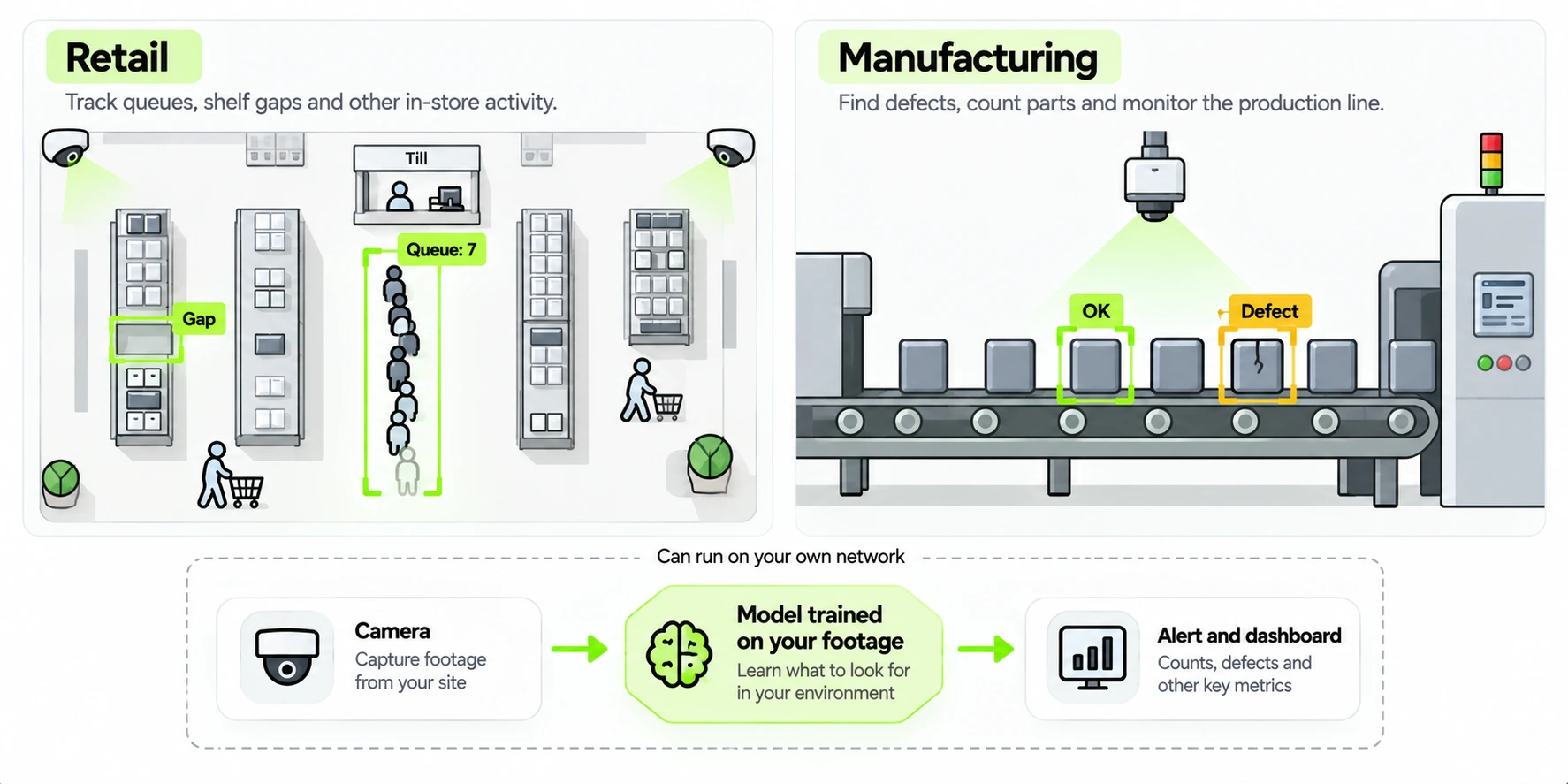
Many stores and factories have cameras that nobody watches. The footage gets looked at after something goes wrong, when it's too late to do more than find out what happened.
Computer vision solutions turn that footage into numbers a system can act on: how many people are in the queue, whether a shelf has a gap, whether a part has a scratch, whether someone has walked into a restricted zone.
What computer vision solutions do
A computer vision solution looks at images or video and produces data that other systems can use directly: a count, a defect label, a reading, an alert. The tasks run from mature to temperamental. Detecting and counting objects is the mature end, and reading text off labels is close behind. Anomaly detection is the hardest to predict, because "unusual" means whatever the training footage didn't contain. Zone rules, such as an alert when something crosses a line, sit on top of detection and are only as good as it is.
The question asked of the picture changes between industries, and the hard parts change with it. The same kind of detection model that counts people at a store entrance can count pallets at a dock once it has been retrained on the right images, which is why custom computer vision solutions are trained on your own footage.
What to put in the brief
Vision projects often go wrong at the brief. Before anyone looks at footage, write one page. Say what question the system answers, in a sentence a manager would recognize: how many people are waiting at checkout, whether this seal is intact. Say what a good answer looks like, with a number you can test against, such as a count within five percent of a manual count. List the cameras that exist, with their positions and what each one currently sees. Describe the conditions the system has to work in, including the worst ones: night shifts, steam, strong sunlight through a door. Say where the answer has to go and how fast, whether that's a dashboard, an alert or a signal to a line controller. And write down the constraints that can't move, such as footage that must stay on site, no identification of individuals, or a ceiling on cost per camera.
A brief like that gives a vendor or an internal team something to be wrong against, and it makes the later test mechanical.
Computer vision solutions for retail
The retail uses that work best replace a person who walks the aisles with a notebook. A camera can spot a gap on a shelf before a customer does, count the people waiting at the checkouts so another one opens when the line passes a threshold, and count entries and exits by hour (with no need to know who anyone is). It can compare what is on a shelf with what the layout says should be there, and estimate how many units are left.
Retail has its own difficulties. Light changes with the hour and the season, shoppers and carts block the shelf, a model trained on last season's boxes misses this season's packaging, and small items packed tightly are hard to count from a ceiling camera.
Decide about privacy at the start. Counting people doesn't require identifying them, and a system that outputs "twelve people in the queue" and keeps no faces holds far less personal data than one that recognizes individuals.
Computer vision solutions for manufacturing
A production line is stricter, because the output often drives a physical decision. Visual inspection checks parts against a standard (scratches, missing components, wrong labels, misaligned seals) and can run on every part at line speed instead of on a sample. Other jobs include counting parts or cartons through a stage, reading serial numbers, batch codes and expiry dates into the system that needs them, and raising an alert when someone enters a restricted zone or a vehicle and a pedestrian get too close. That last alert supports a safety process; it doesn't replace certified safety equipment.
The hard parts differ from retail. Defects are rare, so there are few examples to train on, and the model has to learn what a defect looks like from a handful of images. Lighting has to be controlled, since a change in glare can fool a model that worked yesterday. A false reject (a good part flagged) and a false accept (a bad part passed) cost different amounts, and the right balance depends on the product. And the result has to reach the line controller or the quality system in time to act on it, so integration is part of the job from the start.
What the picture needs
A model can only work with what the camera captured, so measure the picture before you measure the model. Count pixels on the object and ignore the megapixel figure in the spec sheet: a face, a label or a scratch has to cover enough pixels to be distinguishable at the distance it's seen from. In our Unilever Pakistan Foods design the face cameras sit where a face fills at least 750 pixels per meter, and a small LED light keeps the lane bright on night shifts.
Light is the second thing. Even, diffuse lighting beats a brighter but harsher setup, glare from a window or a shiny surface can erase detail, and a camera that sees a doorway with the sun behind it will lose whoever stands in it. Frame rate depends on how fast things move: a conveyor needs more frames than a queue. And mounting is easy to underrate, because a camera on a wobbly bracket drifts out of the position the model learned. None of this is exciting, and fixing it is often cheaper than extra training.
Camera placement for counting and for faces
From high on a wall a camera sees the whole floor, which suits counting, but mostly the tops of heads, which is no use for faces. The recognition vendors we reviewed for one project ask for a view no more than about 15 degrees above eye level.
That project was the Unilever design. The brief asked for people to be counted in marked zones and also identified. In the design the counting cameras sit 4 to 6 meters up in the halls, looking down at the zone, and the face cameras sit 2.4 meters up on lanes where people walk toward them, so the angle down to a face stays close to that limit. No single camera position could do both jobs, so the design uses two kinds. The full case study goes through it, including how the cost came down by more than 90 percent from the first version.
How much footage you need, and how to label it
Teams usually ask how many images they need. Variety in the footage decides more than the frame count. A model has to see the range of conditions it will meet: different times of day, seasons, crowd levels, product variants and camera positions, plus the awkward cases such as a part rotated the wrong way or a cart left in an aisle. Ten thousand frames from one sunny Tuesday teach less than two thousand collected across a month.
Labeling is where the categories get decided, and they should be the ones your team already uses. If inspectors call a defect a scratch, a dent or a burr, the labels should too, because the same people will read the output. Write a short labeling guide with example images of each class and of the borderline cases, and have two people label a sample independently. Where they disagree, the guide is unclear, so fix the guide as well as the labels. A model trained on inconsistent labels learns the inconsistency.
Split the data carefully. If you test on frames taken seconds apart from training frames, the score will look excellent and mean little, because near identical frames sit on both sides of the split. Split by day or by camera, so that the test set holds footage the model hasn't seen in any form. And keep the hardest frames in a separate set, as an honest check on the cases that cost you the most.
How to judge accuracy on your own footage
A vendor demo shows how the system performs on the vendor's footage. Your lighting, angles and edge cases decide how it performs on yours, so test any AI powered computer vision solution on a sample of your own video. Include the awkward cases: the worst lighting, the busiest hour, the camera somebody knocked a few degrees.
Two measures cover most needs. Precision asks: of everything the system flagged, how much was right? Recall asks: of everything that was really there, how much did the system find? A queue counter with high precision and low recall undercounts people; a defect detector with high recall and low precision flags good parts. Decide which error costs you more before you look at the numbers, because most systems let you trade one for the other with a confidence threshold.
Send a low confidence reading to a person to decide. When the output drives a physical decision, that's the safe default. For the test itself, have two people count the same footage independently and score the system against the result they agree on; the Unilever proposal specifies exactly that as its two week acceptance test.
A worked example: a queue counter
Take an invented grocery store that wants an alert when more than six people are waiting at the checkouts. The brief names the question, the threshold and the camera, a ceiling unit above the lanes. Two staff count the people in 200 short clips from different times of day, and where they disagree by more than one person, the clip is set aside as ambiguous. The system is scored on the rest.
The first run overcounts when a shopper stands between two lanes and undercounts when a cart blocks the view. The team adds the awkward clips to the training set, redraws the counting zone so that it covers the queue and leaves out the aisle beside it, and runs again. Recall is good but a few misses remain, so they set the alert at six people on screen to make up for them. A manager sees the alert on a phone and opens another lane. Nothing about this is advanced; most of the work went into the counting zone and the clips.
Staying accurate in the field
A model that scored well in testing can degrade in production for dull reasons. Someone bumps a camera. A lamp is replaced with one of a different color. Packaging changes for a new season. A window gets cleaned, or doesn't. None of these is a model failure in the usual sense; the inputs changed and the model was never retrained.
Watch for it with three habits. Track the model's confidence over time, because a drop across many readings is an early sign that the inputs have shifted. Sample frames for human review on a schedule, weekly at first, and compare the human count with the system's. And keep a route open for retraining: footage from the awkward cases goes into the next training set, after a person has reviewed it. Decide in advance who owns this, because a vision system nobody watches decays gradually, and you find out when a number looks wrong in a meeting.
On premises or in the cloud
Video is heavy and often sensitive. Sending every stream to a cloud service costs bandwidth, adds delay and moves footage outside your walls. Where footage can't leave the building, run the system on your own network: a server with a GPU on site can decode and analyze many camera streams at once. The Unilever design processes all fifteen streams on one existing server and keeps video off the plant's wifi. Cloud processing is simpler to start with and fine wherever privacy allows it.
Privacy and consent in practice
Cameras that watch people carry obligations, and the design should meet them before the first frame is recorded. Start by asking whether the task needs identification at all. Counting, queue length and zone occupancy don't, and a system built to produce only counts can discard faces at the edge, which leaves much less to protect.
Where identification is needed, treat consent, retention and signage as part of the design. The Unilever Pakistan Foods design is a useful reference. Only people who have given written consent are enrolled, and a worker who declines can use a badge instead, without penalty. Unknown people's templates expire after 24 hours unless a supervisor flags an incident, snapshots expire after 30 days, and a worker who withdraws consent has their template removed within 14 days. Data is encrypted, access follows roles, and each enrollment, search and export leaves an audit log entry. Signs at every camera area say what is recorded and why, and a data protection impact assessment is signed off before go live. Nothing in that list is unusual. Writing it down before the system runs is far easier than assembling it after a complaint.
Getting the results to people
A count nobody sees changes nothing, so plan where the output lands. For a live check such as a queue, an alert that fires when the line passes a threshold is more useful than a chart. For quality or stock, a daily summary that shows the trend, with the incidents listed underneath, tends to get read. Set alert thresholds with the people who will receive them, because an alert that fires twenty times a shift gets ignored by the second week. And send the result into the system that acts on it, whether that's the stock system, the line controller or the rota, so that nobody has to retype a number from a screen.
A sensible first project
Choose one check that a person does by eye today and that repeats: counting a queue, checking a label, scanning a shelf. A plan that fits a first project has four steps.
The first is a footage review, which takes a few days. Look at what your cameras record for the check you chose, at the worst hour and the best, and decide whether the picture can support the answer you need. If it can't, say what would change that, such as a camera moved or a light added, before spending anything on models.
The second is a baseline, which takes about a week. Count or inspect by hand, with two people working independently on the same footage, and write down how they differ. Human disagreement is the ceiling on what a system can be scored against.
The third is a trial on recorded footage, over a few weeks. Build the labeled set, train, and score the model on footage it hasn't seen. Fix what the errors show, which is more often the labeling guide or one awkward camera than the model itself.
The fourth is a live run alongside people, again over a few weeks. The system runs on the real feed while a person still does the check, and you compare the two every day. Rely on it only when it matches the people on the cases that count and its uncertain readings are being routed to somebody. Keep collecting the odd frames throughout, because a vision system fails on those, rarely on the thousandth identical one.
Our work on computer vision solutions follows that order. If you have a check in mind, tell us what your team inspects or counts today and we'll say whether vision can carry it: get in touch.
Topics
- Computer vision solutions
- Retail computer vision
- Manufacturing AI
- Visual inspection
- Video analytics
- On premises AI
Frequently asked questions
Get started
Stop paying people to do what an agent can
Tell us what you want to automate. We will map the workflow, deploy the right agents, and train your team to run them.
- Every agent is trained on your own workflows, never a generic template
- Most deployments are live within two to four weeks
- SOC 2 compliant, with a complete audit trail on every deployment