
What Is CRM Automation? The Complete Guide to AI Workflows, Lead Scoring, and Sales Automation in 2026
What CRM automation actually is, how it differs from the CRM software you already own, and where agentic AI fits in for 2026.
Sufi Inam Ul Hassan
AI Engineer13 minute read
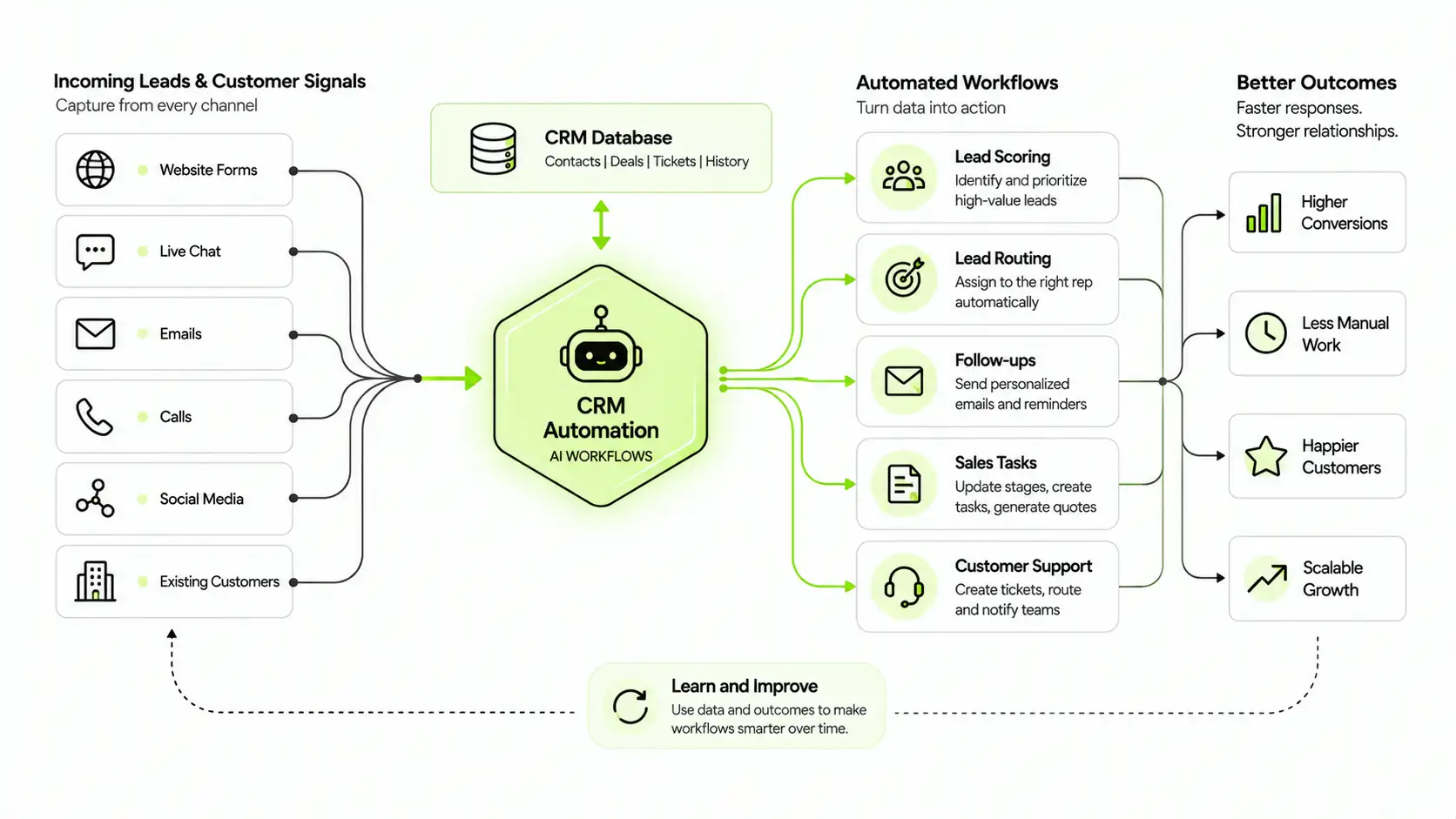
"Owning a CRM is not the same as automating the workflow inside it. Automation is what turns a system of record into a system that actively works on your behalf."
Most sales and support teams did not choose to spend their day copying data between spreadsheets, chasing leads that went cold three days ago, or writing the same follow up email for the fortieth time this month. Yet that is exactly where a huge share of working hours still go. CRM automation exists to close that gap. It takes the parts of customer relationship management that follow a predictable pattern and lets software, increasingly AI driven software, handle them instead of a person.
This guide covers what CRM automation actually is, how it differs from the CRM software you may already own, where AI and agentic AI fit into the picture in 2026, and what a realistic path to automating your own CRM workflows looks like.
What is CRM automation, really?
CRM automation is the use of software rules, and increasingly artificial intelligence, to carry out repetitive customer relationship tasks without someone manually triggering each step. A CRM, on its own, is essentially a database. It stores contact records, deal stages, support tickets, and communication history. That data sits there until a human logs in and acts on it.
Automation is the layer on top of that database that makes it act on its own. When a new lead fills out a form, automation can route it to the right rep, send an acknowledgment email, and log the source, all within seconds and without anyone touching a keyboard. When a deal sits untouched for a week, automation can flag it, remind the owner, or trigger a check in message.
The distinction matters because plenty of businesses have a CRM and still run it manually. Owning the software is not the same as automating the workflow inside it. CRM automation is what turns a system of record into a system that actively works on your behalf.
Why CRM automation matters more in 2026 than ever
Customer expectations around speed have shifted hard in the past few years. A lead that does not hear back within minutes often moves on to a competitor who responded faster, regardless of who has the better product. Manual processes simply cannot keep pace with that expectation once a business has more than a handful of leads coming in per week.
At the same time, the technology behind CRM automation has matured quickly. What used to mean simple "if this, then that" triggers now increasingly includes machine learning models that predict which leads are worth prioritizing and AI agents that can carry out multi step actions on their own. Analysts covering enterprise software widely expect task specific AI agents to become a standard feature inside business applications over the next year, not a novelty reserved for large enterprises.
The businesses that automate now are not just saving time. They are building a response speed and consistency that manual teams, no matter how hardworking, structurally cannot match at scale. A rep juggling forty open deals cannot realistically remember to follow up with each one on the ideal day, every single time, for months on end. Software does not get tired, does not forget, and does not have an off day. That reliability compounds over a year into a meaningfully different customer experience than a competitor still running everything by memory and sticky notes.
The core workflows CRM automation handles
CRM automation is not one feature. It is a set of workflows that, together, cover most of the repetitive work inside sales and customer management.
Lead capture and routing
When a prospect fills out a form, requests a demo, or messages through a chat widget, automation captures that information immediately, creates or updates their record, and assigns them to the right rep or queue based on criteria like territory, deal size, or product interest. No one has to manually check a form submissions inbox and copy details into the CRM by hand.
Lead scoring and prioritization
Not every lead deserves the same attention on day one. Lead scoring automation ranks contacts based on signals such as engagement level, company size, or behavior on your site, so reps know who to call first. Predictive lead scoring takes this further by learning from your own historical deal data, identifying which combinations of signals actually correlated with closed deals in the past, and applying that pattern going forward rather than relying on fixed point values someone set manually months ago.
Sales force automation
This covers the mechanics of moving a deal forward: updating a pipeline stage when a contract is signed, generating a quote from a template, setting task reminders for follow up calls, and logging activity automatically instead of asking reps to do it after the fact. Sales force automation is often the first place teams see a measurable jump in how many deals a single rep can manage.
Follow up and email automation
Sequences of follow up emails, missed call text backs, and appointment reminders run on their own once a trigger fires, whether that trigger is a form submission, a missed call, or a deal sitting idle for a set number of days. This is usually where CRM automation delivers the fastest visible return, since missed follow ups are one of the most common and most avoidable ways revenue slips through the cracks.
How AI and agentic AI are changing CRM automation
Early CRM automation was rule based. A team would set a condition and an action: if a lead's score crosses a threshold, assign it to a rep. That approach still works, but it needs someone to define every rule in advance and update it as circumstances change.
AI powered CRM automation adds a layer that learns rather than only following fixed instructions. Instead of scoring leads on rules someone wrote once, an AI model reviews thousands of past deals and identifies which patterns actually predicted a close, then applies that model to new leads as they arrive. The same approach applies to forecasting, where AI reviews pipeline data and flags deals that are at risk of stalling before a rep would have noticed on their own.
Agentic AI goes a step beyond prediction into action. Rather than simply recommending what a rep should do next, an AI agent can carry out the next step itself: qualifying a lead through a short conversation, drafting a personalized follow up email based on the prospect's history, updating a record, or scheduling a meeting, all without a person initiating each individual step. The rep still sets the boundaries and reviews outcomes, but the agent handles the repetitive execution in between.
This shift matters for smaller teams in particular. Predictive lead scoring and agentic follow up used to require large volumes of historical data and dedicated data science resources, which put them out of reach for most small and mid sized businesses. As these capabilities get built directly into CRM automation platforms, that advantage becomes available to teams that never had a data science budget to begin with.
CRM automation vs marketing automation, where the line actually is
These two terms get used almost interchangeably, which causes real confusion when a business is deciding what to buy. The simplest way to separate them is by who they are built for and what they act on.
Marketing automation operates on audiences. It manages email campaigns, nurtures broad segments of contacts who have not yet had a one to one conversation with your team, and tracks engagement at a campaign level, things like open rates and click throughs across a list of thousands.
CRM automation operates on individual relationships. It manages a specific contact's record, a specific deal, a specific support ticket, and the actions tied to that one relationship, like when to follow up, who owns it, and what stage it is in.
In practice, most growing businesses need both, and the two are meant to work together rather than compete. Marketing automation nurtures a lead until they show real buying intent, then hands them off to CRM automation, which takes over the one to one relationship from that point forward. Problems usually show up when a business tries to use a marketing automation tool to manage individual sales relationships, or a CRM to run broad campaign marketing. Each tool is built around a different unit of work, and stretching it past that design tends to create more manual patching than it saves.
Real examples of CRM automation in action
Abstract descriptions of automation are useful, but concrete examples make the value obvious.
A service business gets a form submission after hours. Automation sends an instant acknowledgment, creates the lead record, and assigns it to the first available rep for the next morning, so the prospect never wonders if their inquiry disappeared into a void.
A sales rep misses a call from a prospect. Rather than that lead going cold because no one called back before the prospect moved on to a competitor, automation sends an immediate text letting them know someone will follow up shortly.
A deal has been sitting in the same pipeline stage for ten days with no activity logged. Automation flags it for the rep and their manager, prompting a check in before the opportunity quietly dies from neglect rather than a real "no."
A customer's contract renewal date is approaching. Automation triggers a reminder sequence weeks in advance, giving the account team time to have a real conversation instead of scrambling the week the contract lapses.
A batch of leads went cold months ago and no one ever circled back. A database reactivation workflow resurfaces contacts who fit the ideal customer profile but never converted, and puts them back in front of a rep with fresh context, rather than letting paid for leads sit forgotten in a list no one opens anymore.
None of these require a person to remember to act. That is the entire point.
The benefits of automating your CRM
The time savings get the most attention, and they are real: teams routinely report getting meaningful hours back per rep per week once data entry, reminders, and follow ups stop requiring manual effort. But the less obvious benefits often matter more over time.
Consistency improves sharply. Every lead gets the same acknowledgment speed and the same follow up cadence regardless of how busy a rep is that day or whether they happen to be out sick. Data quality improves too, since automated logging removes the human tendency to update the CRM only when there is time, which in practice often means never.
Forecasting becomes more reliable because the data behind it is more complete and current. And perhaps most importantly for a growing business, automation lets a team handle a larger volume of leads and customers without needing to hire in exact proportion to that growth. That is usually the difference between a sales team that scales sustainably and one that burns out trying to manually keep up with its own success.
How to start automating your CRM workflows
The businesses that get the most value out of CRM automation rarely try to automate everything at once. A more realistic path starts by mapping the workflows that already happen manually today: who follows up with a new lead, how long that usually takes, and where deals tend to stall.
From there, prioritize the workflows where a delay costs the most. Instant lead response and missed call follow up are almost always the highest impact places to start, since response speed has an outsized effect on conversion and the automation itself is straightforward to set up. Follow up sequences and stale deal alerts are typically next, since they recover opportunities that a manual process quietly lets go cold.
AI driven features like predictive lead scoring are worth adding once there is enough historical deal data for a model to learn from. A team with only a handful of closed deals will not get much value from predictive scoring yet, no matter how advanced the underlying model is. Layering automation in this order, starting with the workflows that plug the most obvious leaks before moving to the ones that need more data, tends to produce results faster than trying to automate every process on day one.
What to look for in a CRM automation platform
Not every CRM automation platform is built the same way, and the differences matter once you are relying on it daily. Look for a platform that lets non technical team members build and adjust workflows themselves, since waiting on a developer every time a process needs to change defeats much of the purpose of automating in the first place.
Integration matters just as much. A CRM automation platform that cannot connect cleanly to your email, calendar, and existing tools will always leave gaps that someone has to fill manually. And as AI and agentic features become standard, transparency matters more than ever: a platform should make it clear what an AI agent is doing and why, and give a team the ability to review and adjust its actions rather than treating it as a black box.
This is the thinking behind how Gezora's CRM Automation is built, with workflow tools a sales or support team can configure without engineering help, and AI features designed to be reviewed and trusted rather than simply trusted blindly.
CRM automation is no longer an optional efficiency upgrade. It is quickly becoming the baseline expectation for how a modern sales or service team operates, and the gap between teams that have adopted it and teams still working manually is only going to widen from here. The businesses that start now, even with a single high impact workflow like instant lead response, will spend the next few years compounding an advantage that gets harder for slower moving competitors to close.
Topics
- CRM automation
- Lead scoring
- Sales force automation
- Agentic AI
- Marketing automation
- Predictive lead scoring
Frequently asked questions

Get started
Stop paying people to do what an agent can
Tell us what you want to automate. We will map the workflow, deploy the right agents, and train your team to run them.
- Every agent is trained on your own workflows, never a generic template
- Most deployments are live within two to four weeks
- SOC 2 compliant, with a complete audit trail on every deployment