
How to automate business processes: where to start and what to skip
How to automate business processes without automating the wrong thing: pick a process worth the effort, map it as it runs, and measure it against a baseline.
Sufi Inam Ul Hassan
AI Engineer13 minute read
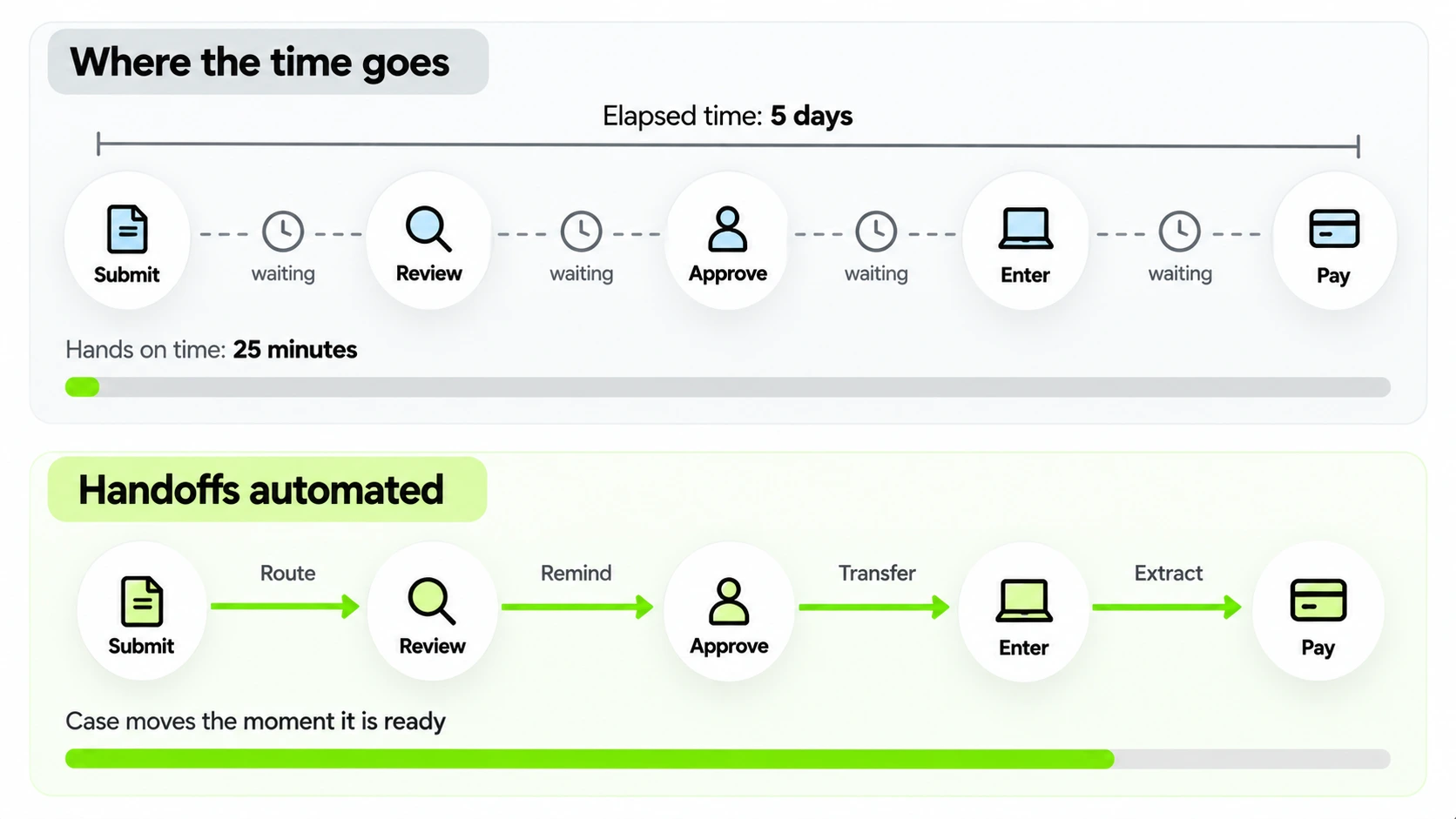
Ask a team which part of their process is slow and they'll point at the part they like least. Timing a few cases usually shows something else. In many business processes the work itself takes minutes and the elapsed time runs to days, because the case spends most of its life waiting: for an approval, for someone to pick it up, for a document to be retyped into the next system.
When you decide how to automate business processes, start from that gap. Automating a task makes one step faster. Automating the process, meaning the handoffs between steps, is what shortens the time from request to result.
Start with a process worth automating
Look for four traits. The process runs often, so any saving repeats. It follows roughly the same shape each time. A person is mostly moving data from one place to another, which adds delay and no judgment. And it crosses at least two teams or systems, because that's where the waiting hides.
Six common business process automation examples pass that test.
| Process | What a person does today | What changes |
|---|---|---|
| Supplier invoice intake | Reads each invoice, retypes the figures and chases a manager for approval | The system reads the invoice on arrival, matches it to the purchase order and routes it to the approver |
| New employee onboarding | Sends the same emails and books access requests by hand | Requests go out when the offer is accepted, and each owner gets reminders until the task is done |
| Support ticket routing | Reads every ticket and decides which team gets it | The system classifies tickets and sends them to the right queue, and unclear ones go to a person |
| Expense approvals | Forwards receipts and waits for a reply | The system checks receipts against policy, and only the exceptions reach a manager |
| Vendor onboarding | Collects forms by email and checks them against a list | The system validates forms as they arrive and asks for anything that is missing |
| Contract renewal reminders | Somebody remembers, or doesn't | The system sends the owner a notice on a schedule, with the contract attached |
Map the process as it actually runs
A documented process describes how the work was meant to go. The real one has side channels: the shared inbox that two people watch, the manager who approves by replying "ok" from a phone. None of that appears in a process diagram, and an automation built from the diagram can break on it.
The cheapest way to see the real process is to take ten recent cases and trace each one from start to close. For each case, write down every state it passed through, who touched it, and when it arrived and left. Many systems already keep those timestamps in ticket histories, email threads or audit logs. Process mining tools can read the logs and draw the flow for you, though tracing ten cases by hand in a spreadsheet takes an afternoon and is enough for a first pass.
Keep the record simple: a case number, the time each state started, who owned it, what they did, what they were waiting for, and whether the case bounced back to an earlier step. The last two columns are the ones that find the savings. A case that bounced twice usually points to a design flaw, and the approver gets blamed.
Two numbers come out of this. Touch time is the minutes someone spent working on the case. Elapsed time is the calendar time from start to close. The gap between them is the waiting.
Say an invoice approval takes twenty five minutes of touch time, spread across four people, and an average of five working days from arrival to approval. Five working days of eight hours is 2,400 minutes, so about one percent of the elapsed time is anyone working on the invoice. Making each person faster at their share of the twenty five minutes would barely register.
Automate the handoffs first
A handoff is any point where a case moves from one person or system to another: submitted, forwarded, approved, entered into the next system. Each handoff is a place where work can sit. Automating them means the case moves the moment it is ready, whoever or whatever is on the other side. In practice that means routing each case to the right owner, escalating an approval that sits for two days, moving values from the form into the next system, and reading incoming documents on arrival.
Compare that with automating a single task, say a macro that fills in a form faster. The form still waits in the queue afterwards. Task automation is worth doing, but if you want to cut elapsed time the handoffs are where to look. Skip them and a team can automate five steps and find the process takes about as long as before.
A worked example: a purchase approval
Take a purchase approval at an invented company with about three hundred staff. (Every figure here is made up for the example.) Today a request starts as an email to a manager, who replies "ok". The requester forwards that reply to finance, finance checks the budget in a spreadsheet, a buyer creates the purchase order in the ERP, and the order goes to the supplier by email. Traced across ten cases, the touch time is about forty minutes, spread over four people. The elapsed time averages six days.
The map shows where the six days go. Requests sit in managers' inboxes for a day or two, because approval is one more email among many. The reply to finance gets filed instead of forwarded in about one case out of five. Finance checks budgets in batches on Tuesdays and Thursdays. And the buyer waits for a complete request, so anything missing a cost center bounces back and starts the clock again.
Automation goes after those waits, in order. The request becomes a short form with the cost center and amount as required fields, which removes the bounce. The form routes to the right approver by amount and department, and reminds them after a day. The budget check reads the finance system directly instead of waiting for Tuesday. An approved request creates a draft purchase order for the buyer to confirm. Requests over a limit, or from a new supplier, still go to a person with the context attached.
If those waits shrink as planned, elapsed time falls from six days to perhaps a day and a half. Touch time falls too, but by much less; almost all of the gain comes from the waiting that went away.
A second example: onboarding a new hire
Onboarding shows the same pattern with more teams. An offer is accepted, and then a dozen things have to happen: HR creates the record, IT creates accounts and orders a laptop, facilities arranges a desk, the manager plans the first week, and the new hire needs access to six systems. At an invented company of similar size the process runs on email. HR forwards the acceptance to IT, IT replies with questions, somebody forgets facilities, and on day one the new hire waits for a laptop.
Map ten recent hires and the pattern is familiar. Touch time is perhaps three hours across all the teams, spread over the two weeks before the start date, and in three of the ten something was missing when the person arrived. The automation here is mostly parallel handoffs. Acceptance triggers every task at once, each owner gets theirs with a due date, reminders go out as the start date nears, and one status page shows what's done. Contractors and part time staff follow a different branch, which is an exception to define before launch, so nobody discovers it afterwards. The measure is simple: the share of new hires with everything ready on day one.
Decide what happens when it breaks
Automating business processes means meeting cases the automation doesn't understand: a scan that's upside down, a purchase order with a missing field, a customer who writes in two languages. What the process does next decides whether people trust it.
There are two bad answers. The process can fail silently, so the case sits in a queue nobody is watching, or it can guess and pass a wrong result downstream with a straight face. The good answer is an exception path: the case goes to a named person with everything the automation knew about it, so they pick it up where the machine stopped.
Track the exception rate from the first day. Many recurring exceptions point at a design flaw, either a rule that's missing or an intake form that allows something it shouldn't (some are inherent, like that customer writing in two languages). A process that still sends most cases to a person has only moved the sorting.
Sort exceptions into three kinds early, because each has a different owner. Missing information (a blank field, an unreadable document) goes back to the requester with a specific question. Ambiguity, where the system can't tell which of two categories fits, goes to whoever knows the domain best, with both candidates shown. Policy exceptions, such as an amount over the limit or a new supplier, go to the person who owns the policy. Mix the three into one queue and the wrong person sees most of them.
How much judgment the exception path needs depends on how messy your inputs are. Rule based flows handle clean, predictable inputs well and reject the rest. Where documents and requests vary a lot, an AI agent working inside written boundaries can take on more of the odd cases and escalate the remainder, and that is what agentic workflow design is for.
Measure against a baseline you wrote down first
Before go live, record three numbers for the process: elapsed time from start to close, touch time per case, and the share of cases that need rework. Put them somewhere other people can see. After go live, measure the same three the same way, starting on the first day.
The common failure is a before and after comparison drawn from memory, in which the old process feels slower than it was and the new one feels faster than it is. A baseline on paper also protects the project when somebody asks, six months in, whether the money was well spent.
Be careful how you read the numbers. Averages hide the cases that hurt, so report the median and the slowest tenth separately: a process that closes most cases in a day and a few in a month has a different problem from one that takes a week for everything. Count cases that are still open as well as the ones that closed, or the new process will look faster only because its slow cases haven't finished. And treat "hours saved" with suspicion. An hour saved from retyping is only real if the person spent it on something else, so ask what happened to the time.
The first month after launch
Plan the first month before go live. In week one, read every exception yourself, every day, because the exceptions show you where the rules are wrong. In week two, move to a daily summary and fix the top two causes. By week four, review the same three numbers you recorded in the baseline and compare them honestly. Then decide: extend the process to more cases, fix what the exceptions revealed, or stop. Stopping is a legitimate result when the baseline says the process wasn't worth it.
Processes to leave alone
Some processes aren't worth automating yet.
- Rare ones, because the build rarely pays back.
- Ones that change every month, because you'd rebuild the automation each time.
- Ones where nobody agrees on the policy. If two teams disagree about the approval limit, the automation will encode one of them, and the other team finds out when a payment is held.
- Ones where judgment dominates and a mistake is expensive, at least until a human approval step can sit in front of the risky part.
If the process itself is broken, fix it on paper first. Our AI readiness assessment framework can help you sort candidates into automate now, fix first and leave alone.
Why automation projects stall
Most stalls have ordinary causes. The scope grows from one process to the whole department before the first one works. Nobody owns the result after the build, so exceptions pile up unread. The data the automation needs sits behind an approval that takes weeks. The accuracy target was never written down, so every wrong result restarts the argument about whether it's good enough. Or the process changes (a new approval limit, a reorganized team) and nobody updates the rules.
Each of these has a cheap defense. Pick one process and finish it. Name an owner with time to review exceptions. Request system access in the first week. Write the accuracy target and the cost of an error on a page before the build starts. And schedule a review every quarter to ask whether the rules still match the process, because they won't for long.
Bringing the people who do the work along
The people who run a process today know where it breaks, and they will also be the ones living with the automation. Involve them from the mapping stage onward, long before launch. Ask them to show you their workarounds, and when the automation absorbs one, say so; a workaround that vanishes without explanation reads as a threat.
Be straight about what changes in their day. If a person used to retype fifty invoices a week and now reviews the exceptions, that's a different job, and some will like it more than others. Tell them which decisions stay theirs, how to flag a wrong result, and who fixes it. Make the exception queue part of the job description, so it never reads as a punishment.
Share the measurements too. When elapsed time falls from six days to under two, the people who got it there deserve to see the chart. If results only travel up to management, the next process gets harder to map, because the people who hold the knowledge learn to keep it to themselves.
A word on tools
Business process automation tools fall into a few families. Low code platforms let people who don't write code build flows, and they suit stable processes with clean inputs. Robotic process automation replays clicks on screens, which helps when a system has no API and breaks when the screen changes. Integration platforms connect systems through their APIs and events. AI agents read messy inputs and make bounded decisions. Most real processes need more than one of these.
Five questions narrow the choice quickly. Where does the work live: in systems with APIs, or on screens with no API? Are the inputs clean forms, or free text and scans? Do the rules change yearly, or monthly? Who will maintain it: a developer, an analyst, or nobody? And what does the audit need: a record of every decision, or only of the outcome? Stable rules on clean data in systems with APIs point to an integration platform or a low code flow. No API points to RPA, with the caveat that it breaks when screens change. Messy inputs point to an AI agent with written boundaries. When two options look equal, the audit requirement is a sensible tiebreaker.
We prefer to build inside the systems a team already runs, so that there's no new platform to maintain, and that's how we approach business process automation software: we start by mapping the real process and measure from the first day live.
If you want a concrete first step, take one process you suspect is slow, pull ten recent cases, and compare touch time with elapsed time. For a second opinion on which process to pick, get in touch.
Topics
- Business process automation
- How to automate business processes
- Process mapping
- Workflow automation
- Automation ROI
- Operations
Frequently asked questions

Get started
Stop paying people to do what an agent can
Tell us what you want to automate. We will map the workflow, deploy the right agents, and train your team to run them.
- Every agent is trained on your own workflows, never a generic template
- Most deployments are live within two to four weeks
- SOC 2 compliant, with a complete audit trail on every deployment