
RFQ Management Software That Works With Your ERP: Oracle, Odoo, 1C, SAP, and NetSuite
How RFQ automation actually connects to the ERP you already run, from SAP and Oracle to 1C, and what a real pilot costs before you commit.
Sufi Inam Ul Hassan
AI Engineer12 minute read
"The technology behind RFQ automation is not the hard part anymore. Whether it fits the ERP, the language, and the email platform you already run is what decides everything else."
Before almost every serious procurement automation conversation, the same three questions show up, in some order. Does it work with the ERP we already have. Does it work in the language our suppliers actually use. And what does a real pilot cost, not a demo, an actual working test on one category of spend. A multi site agribusiness manufacturer we spoke with recently put it plainly: their team runs on 1C for the ERP and Excel for everything else, their supplier correspondence is in Russian, and they wanted automated RFQ distribution, requirement extraction from Excel and PDF specs, and a consolidated comparison table before they'd commit to anything further.
None of that is an unusual ask. It's close to the default question set procurement teams bring to any RFQ management software evaluation, and it deserves a direct answer instead of a generic integrations page. This post walks through how RFQ automation actually connects to the systems you already run, in plain terms, without assuming you're starting from a blank slate, and without dodging the parts of the answer that are genuinely more complicated for some ERPs than others.
What RFQ management software actually needs to do
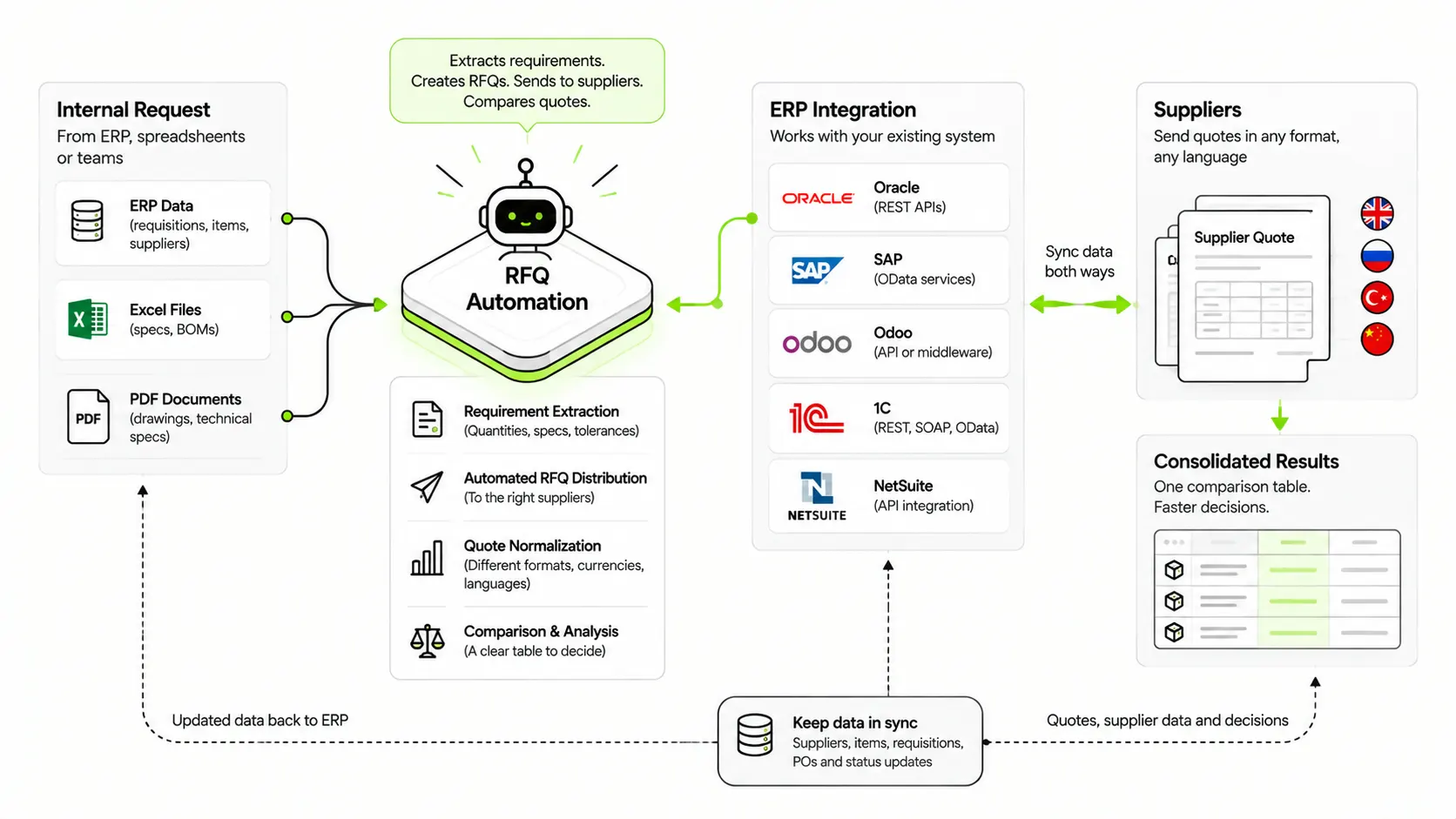
Strip away the marketing language and RFQ management software has to handle three jobs well. First, it needs to turn an internal request, however messy, into a structured RFQ and get it in front of the right suppliers without someone manually copying it into ten separate emails. Second, it needs to read the actual requirement, whether that's a clean spec sheet or a PDF scan someone exported from an old system, and pull out the details that matter: quantities, tolerances, delivery windows, technical specs. Third, once quotes start coming back in different formats, different currencies, sometimes different languages, it needs to normalize them into one comparison table a buyer can actually act on.
Everything else, dashboards, analytics, approval routing, is genuinely useful, but if a platform can't reliably do those three things first, none of the rest matters. That's also exactly why "does it work with what I already have" is the right first question to ask, before anything else. A tool that handles all three jobs beautifully in a sales demo but can't actually read your ERP's supplier list or your team's inbox is not, in any practical sense, RFQ automation software yet, it's a proof of concept waiting for an integration.
ERP integration, does RFQ automation work with your existing system?
This is usually the real blocker, not the AI itself. Most procurement teams did not choose their ERP for its API friendliness, and rightly expect any new tool to work around that rather than demand a system replacement.
SAP and Oracle. These are the two systems most procurement automation platforms are built to connect to first, since they cover the largest share of mid market and enterprise procurement. SAP procurement integration typically happens through SAP's own OData services, while Oracle Procurement Cloud exposes REST APIs for the same purpose, syncing purchase requisitions, supplier records, and PO data in both directions rather than requiring a parallel system.
NetSuite. NetSuite procurement integration is similarly API driven, and one of the more straightforward integrations in practice because NetSuite's procurement objects (vendor records, purchase orders) are well documented and widely supported by middleware tools already.
Odoo. Because Odoo is open source at its core, integration options are broader: a direct API connection, or a middleware layer if you're running a heavily customized instance. Odoo's own purchasing module already supports API based automation, which makes connecting an external RFQ tool to it a known, well trodden path.
1C. This is the one most Western procurement software simply doesn't plan for, which is exactly why it becomes the deciding question for companies running on it, common across Russia, the CIS region, and increasingly the wider region beyond. 1C:Enterprise supports integration through web services, REST and SOAP APIs, and OData, so a connection is technically very achievable. The real gap is usually not capability, it's whether the vendor bothered to build and test it, since so few procurement platforms have a 1C customer to build it for in the first place.
Across all of these, the honest general pattern is the same: a modern RFQ automation platform should read and write through your ERP's existing API rather than asking you to duplicate data entry in two systems, and if a direct connector doesn't exist yet for something less common like 1C, a well built platform can usually stand one up faster than you'd expect, because the underlying data (requisitions, suppliers, POs) looks similar across systems even when the ERP itself doesn't.
Where integration projects actually go wrong
Most failed procurement automation rollouts don't fail because the AI made a bad call, they fail because the integration assumptions were wrong from week one. A few patterns show up often enough to be worth naming directly.
The first is mistaking a sales demo for a working integration. A platform that looks fully connected in a demo environment, populated with clean sample data, can behave very differently against a real ERP instance with years of inconsistent supplier records and half finished data migrations. Ask to see the integration working against a sandbox of your actual data, not a curated demo, before you commit to a pilot scope.
The second is underestimating data quality as the real blocker. Duplicate vendor records, inconsistent unit of measure fields, and specs buried in free text fields rather than structured ones are the norm, not the exception, in most ERPs, 1C and Excel based setups included. An automation platform needs a plan for that mess, not just an assumption that the data will arrive clean.
The third, specific to less common ERPs like 1C, is assuming "no existing connector" means "not possible." It usually means nobody has needed to build one yet, which is a very different problem to solve, and one that's worth surfacing directly in a sales conversation rather than assuming it rules the platform out entirely.
Email and office integration, Microsoft 365 or Google Workspace
This question comes up almost as often as the ERP one, and the honest answer is that it shouldn't be an either or. RFQ automation that only works inside one ecosystem is a limitation, not a feature. A well built agent should be able to send and track RFQ correspondence through Outlook and Microsoft 365 just as easily as through Gmail and Google Workspace, since both platforms expose the same kind of API access for reading and sending mail, tracking threads, and attaching documents.
In practice this matters most for supplier facing communication specifically, since your suppliers are not going to change their email client for you. The RFQ needs to arrive in their inbox looking like a normal email, and their reply needs to come back into the same thread your team is tracking, regardless of whether your internal team runs on Outlook or Gmail.
Does it work in Russian? Multilingual supplier communication
For any company whose suppliers correspond in a language other than English, this is not a nice to have, it's a precondition. An RFQ automation agent that can only draft and interpret English correspondence is not usable for teams sourcing from Russian speaking, Kazakh speaking, or Ukrainian speaking suppliers, which describes a large share of manufacturing and agribusiness supply chains across the CIS region.
Modern language models handle Russian language business correspondence well, including the more formal register typical of B2B procurement emails, which means the agent can draft the RFQ, interpret a supplier's quoted terms, and flag anything ambiguous in the original language rather than forcing every exchange through translation first. The practical test isn't whether a platform "supports" a language in the abstract, it's whether it can hold an entire RFQ to quote exchange in that language without a human needing to step in to translate at each stage. That distinction matters more than it sounds: plenty of tools claim multilingual support because they can translate an incoming email into English for the buyer to read, which is a much lower bar than actually drafting, negotiating, and clarifying terms in the supplier's own language throughout the exchange.
From spec to comparison table, what actually happens
This is where the three original requirements, RFQ distribution, requirement extraction, and quote consolidation, come together as one flow rather than three separate tools bolted side by side.
It starts with the internal request, often a messy Excel sheet or a PDF spec someone exported from a drawing tool. An AI powered RFQ response and extraction step reads that document, identifies the actual requirement fields (part numbers, quantities, tolerances, delivery dates), and turns it into a structured RFQ template rather than a buyer retyping it by hand. From there, the RFQ goes out to the qualified supplier list by email, in whatever language and platform those suppliers actually use. As responses come back, often in inconsistent formats, PDF quotes, spreadsheet attachments, plain email text, the system normalizes each one into the same comparison table, aligned by price, lead time, and terms, so a buyer can compare five supplier responses in the same view instead of five separate documents.
The result a buyer actually sees is a single comparison table, not five inboxes and a manually built spreadsheet. That is the entire point of RFQ management software: not to replace the buyer's judgment on which supplier to choose, but to remove everything standing between "here's what we need" and "here's how the offers actually compare." Whether that spec started life as a clean Excel template or a scanned PDF someone forwarded from an old system matters far less than most teams expect, once the extraction step is handled properly.
What a pilot actually costs, and how long it takes
This is the question procurement leaders ask last but care about most, since it's the one that determines whether any of this is worth pursuing right now. A useful pilot does not need to touch your entire spend base. The most common, lowest risk starting point is a single spend category, packaging, raw materials, MRO, whatever generates enough RFQ volume in a normal month to produce a meaningful before and after comparison, without requiring a company wide rollout to prove the concept.
Timelines vary with ERP complexity and supplier list size, but a focused, single category pilot typically runs a matter of weeks rather than months once integration access is granted, since most of the setup time goes into connecting the ERP and importing the supplier list rather than the AI configuration itself. Cost depends heavily on category complexity, supplier count, and how much of the existing spec and supplier data needs cleanup before the pilot can start, which is exactly the kind of detail worth working through on a call rather than guessing at in a blog post.
A reasonable way to scope a first pilot: pick the category with high RFQ frequency but manageable supplier count, ten to thirty suppliers is a common sweet spot, agree on what "success" looks like in concrete terms (hours saved per RFQ cycle, days shaved off turnaround, fewer manual comparison errors), and set a fixed evaluation window, four to six weeks is typical, rather than leaving the pilot open ended. That structure gives both sides a clear, measurable answer at the end instead of an ongoing trial that never quite converts to a decision. If you're evaluating this seriously, the fastest way to get a real number is to bring your specific category, supplier count, and current ERP setup to that conversation.
Where Gezora fits in
Gezora's Procurement Automation platform is built around exactly this kind of question set: connecting to the ERP you already run rather than asking you to change it, working across both major email ecosystems, and handling supplier correspondence in the language your suppliers actually use, Russian included. If your team is evaluating RFQ automation and these are the same three questions on your list, that's a conversation worth having before you assume the answer is no.
The bottom line
The technology behind RFQ automation and AI procurement agents is not really the hard part anymore. The hard part, and the actual deciding factor for most teams, is whether it fits into the systems, languages, and email platforms you already use without forcing a rebuild first. Ask the ERP question, the language question, and the pilot cost question early, because the honest answer to all three usually determines whether a project moves forward at all.
Read next: Agentic AI in Procurement Automation, the complete guide to what autonomous purchase to pay looks like once your integration questions are answered.
Topics
- RFQ management software
- RFQ automation
- ERP integration
- Procurement automation
- SAP integration
- NetSuite integration
Frequently asked questions

Get started
Stop paying people to do what an agent can
Tell us what you want to automate. We will map the workflow, deploy the right agents, and train your team to run them.
- Every agent is trained on your own workflows, never a generic template
- Most deployments are live within two to four weeks
- SOC 2 compliant, with a complete audit trail on every deployment