
Types of data sources for RAG systems and which to connect first
The common types of data sources for RAG systems, what tends to go wrong with each, and a sensible order for connecting them.
Sufi Inam Ul Hassan
AI Engineer16 minute read
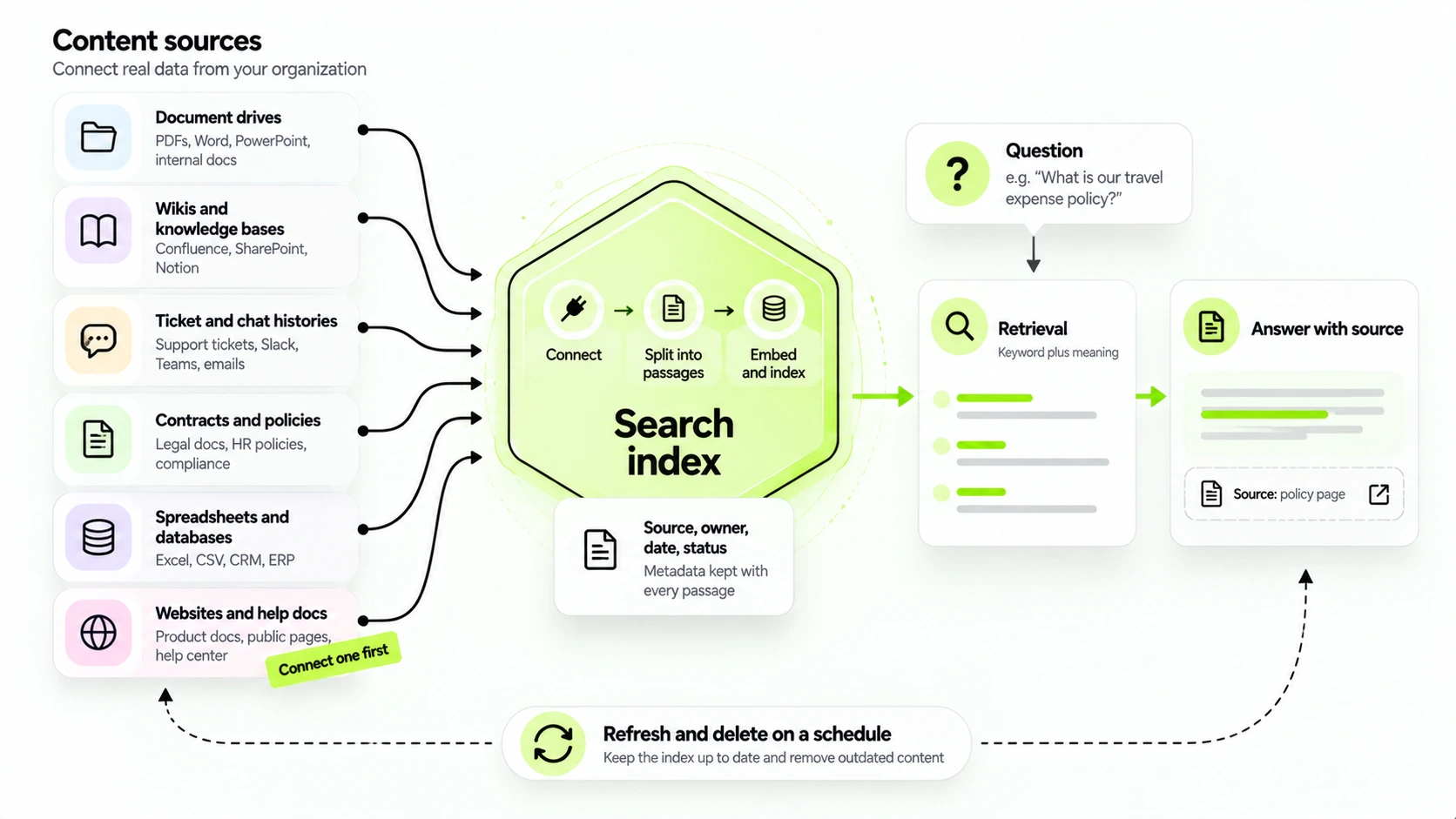
Most RAG demos start the same way. Someone points the system at a folder of tidy PDFs, asks it a few questions, and the answers are good enough to get the project approved. Then it gets pointed at the real company wiki, the shared drive and two years of support tickets, and the answers get worse. The model is the same in both cases; the wiki holds three versions of the refund policy.
A RAG system retrieves passages from your own content and hands them to a language model, which writes an answer from those passages. That makes the content one of the parts you control, alongside chunking, retrieval and model choice, and what you connect first shapes everything after it. The common types of data sources for RAG systems each go wrong in their own way, so the order you connect them in is a decision in itself.
What counts as a data source
In a typical RAG system architecture, a data source is any place the system pulls content from. A connector reads the content, a splitter cuts it into passages, an embedding model turns each passage into a vector, and the passages go into an index that can be searched by meaning, by keyword, or both. Sources differ in format, permissions and how they go stale, so each needs a separate connector and separate checks.
The common types of data sources for RAG systems
The sources below come up most often. They're listed roughly in the order people try to connect them, which is not the order they should be connected in.
Document stores and shared drives
This is where most companies start: PDFs, Word files and slide decks on SharePoint, Google Drive or a file server. There is a lot of content, and the formats are hostile. Scanned PDFs contain no text until OCR has run on them, tables come out as a jumble of numbers, and headers and footers repeat on every page and pollute the passages.
The bigger problem is versions. A drive will often hold three copies of the same policy named "final", "final 2" and "final really", and the retrieval step has no idea which one is current unless somebody tells it. Before connecting a drive, decide which folders count as the source of truth and leave the rest out.
Wikis and knowledge bases
Confluence spaces, Notion pages and internal help centers are easier. The text is mostly clean and has headings, which makes passage splitting simple, though macros, embedded tables and attachments still need handling. The weakness is age. Wikis fill up with pages that were right in 2022 and that nobody dares delete, and a retrieval system will quote them cheerfully.
If the wiki records page owners or a last reviewed date, carry those across as metadata so the index can prefer recent, reviewed pages. If it records neither, add them for the pages you plan to index.
Ticket and chat histories
Support tickets, Jira issues and Slack threads hold the questions people really ask, which is why they're tempting. They also hold half answers, jokes, customer names and phone numbers. A ticket history becomes useful when you keep only resolved tickets whose final reply solved the problem, strip the personal details, and treat that reply as the content and the thread as context.
Raw chat exports are rarely worth the cleanup, and they're a bad place to meet privacy problems for the first time.
Contract and policy repositories
A question like "what is the notice period for supplier X" has one right answer, in one clause, in the latest amendment. Splitting contracts at a fixed length cuts clauses in half, so split by clause or section and keep the contract name, party, date and amendment number attached to every passage. Store each document's access list with its passages and filter on the asking user's groups at query time, so the assistant can't show a clause the user couldn't already open.
Spreadsheets and databases
Numbers need a different tool. If someone asks for last quarter's revenue by region, retrieving a paragraph that mentions revenue is the wrong move. The answer lives in rows, and the right route is a query against the database: the model writes or chooses the query, and a system runs it.
A RAG project usually hits this the first time a finance question arrives. A lookup table such as a price list can be indexed as passages, but exact codes need keyword search, because vector similarity alone is weak on identifiers. Anything that needs arithmetic belongs in the database.
Check who edits a spreadsheet before you connect it. A sheet that five people change by hand is a database nobody admitted to owning, and its numbers can change between an index refresh and the question.
Email holds a company's real decisions, which makes it appealing and risky. Threads quote themselves, so one sentence can appear twenty times, and the content is personal by default. If you connect email, pick a narrow purpose, such as a shared support or sales mailbox, and leave individual inboxes alone.
Websites and public documentation
Product docs, help center articles and the public website are the easiest sources to crawl and the least likely to contain anything sensitive. They make a good first source for a customer facing assistant, as long as the internal exceptions your support team relies on get added from somewhere else.
Which source to connect first
Pick the source with the best answers to four questions. Do the answers people want live there? Does somebody own the content and keep it current? Are the permissions simple (ideally everyone who will use the assistant may read everything in it)? And can you test it, meaning do you have thirty real questions whose answers you already know?
For many companies that points to a product documentation set or an HR policy library: bounded, owned and fairly uniform. It doesn't point to the shared drive, which is where everyone wants to start, and it doesn't point to email. Start narrow, measure, then add a second source and measure again. Every source brings its own noise and its own permission map; add four at once and you can't tell which one made things worse.
Signs a source isn't ready
Some sources fail the four questions in ways you can spot early. Nobody can say who owns the content, or three people each name a different owner. There are several final versions and no status field to tell them apart. Permissions are tangled: either everyone can read everything, sensitive files included, which makes a shared assistant a risk, or nobody can explain who can read what. Most of the files are scans with no text layer, and the last review date, where one exists, is years old. The most telling sign of all is someone saying "it's all in there somewhere" about a folder nobody has opened since the last reorganization.
None of that rules a source out forever. It means the first piece of work is the content itself, and it's better to know that before you've paid for an index you can't trust.
Cleaning before indexing
Whatever a source contains, the index will contain too, so a little cleaning pays off early. Strip the boilerplate that repeats on every page: headers, footers, cookie banners, navigation menus and legal footers. Left in, they become passages that match almost every query and say nothing. Remove exact duplicates, and look for near duplicates as well, such as the same policy pasted into three wikis with small edits. A simple similarity check will find most of them.
Check the text that came out of PDFs and scans before you trust it. OCR (optical character recognition) makes mistakes on tables, stamps and handwriting, and a misread digit in a price list is worse than a missing one. Open ten random extractions next to the originals and compare them. If the language is mixed, tag each document's language so that a French question isn't answered from an English page by accident. And decide early what to do with personal data: either keep it out of the index or mark it so retrieval can respect it, because redacting later means reprocessing those documents.
Splitting sources into passages
The splitter decides what a retrieved passage looks like, and many retrieval problems that look like model problems start here. Two rules cover a lot of ground: split along the structure the document already has, and keep each passage readable on its own.
For a wiki or help center, split at headings, so that a passage is one section with its title attached. For a contract, split by clause and carry the clause number and heading along. For a ticket history, keep each question and its final answer together. For a table, keep the header with the row, or the numbers lose their meaning; a row that says "30" tells nobody anything. Fixed length splitting, say every five hundred tokens, is the fallback for unstructured text, and it works best with a little overlap so that a sentence cut at the boundary appears whole in one passage.
Size is a trade. Small passages are precise but strip context; large ones carry context but dilute the match and crowd the prompt. A common compromise is to retrieve small passages and then pull in the surrounding section for the model to read, which keeps the match precise and the context intact. Whatever you choose, test it on your thirty questions, because the right size depends on your documents more than on any rule of thumb.
Metadata worth keeping on every passage
Metadata is what turns a pile of passages into something you can filter. Keep, at minimum, where the passage came from (system, address and section path), the document title, the owner, the last updated date, the status (draft, approved, retired), the language and the access list.
Each earns its place. The address and section path let an answer cite something a person can open. Owner and date let you prefer fresh material and chase stale pages. Status stops a draft from outranking an approved policy. Without the access list, retrieval has no way to respect permissions. Adding any of these after the fact means reading every document again, so decide the list before the first load.
Why adding sources can make answers worse
More content sounds like more knowledge, and up to a point it is. Past that point retrieval starts to compete with itself. Two near identical passages from different versions of a refund policy both score well, and the model sees both. An old FAQ and a new one disagree, and the old one happens to use words closer to the question. The answer comes out confident and wrong, and the cited source looks legitimate.
RAG system design has a standard set of fixes for this. Attach metadata to every passage (source, owner, date, document status) and filter on it, with status first, since a retired page should never beat a current one. Remove duplicates at ingestion. Prefer newer passages when two current ones conflict. Run keyword and semantic retrieval together, so an exact product code and a loosely worded question both find the right text.
Keeping the index current
Sources change after you load them. A policy is reissued in March and in April the index still quotes the old one. Decide per source how it refreshes: on a schedule (nightly is typical for a wiki), or on an event, such as a webhook when a page is edited, for content that has to be right the same day.
Deletions need the same care as additions. If a document is removed from the source and its passages stay in the index, the system will keep quoting something that no longer exists. Check that the refresh job also removes passages when a source page disappears.
Who owns each source
Every connected source needs a named person on the content side as well as one on the engineering side. Their job is small but real: approve what gets indexed, retire pages that are out of date, and answer the question that always arrives after launch, which is "why did the assistant say that?" That last duty is the important one, because the fix for a wrong answer is often a change to a document, and only the content owner can make it.
Give the owner a way to see what's being asked of their source, such as a weekly list of questions that returned nothing useful, and a clear route to report a bad answer. Give them a little time for it as well. A source whose owner has half an hour a week usually stays accurate; a source with an owner in name only drifts back toward three versions of the refund policy.
A worked example: a support assistant in three stages
The order above might play out like this for an invented company: a software firm with a public help center, an internal policy library and a ticket system.
Stage one connects only the help center, about two hundred articles. The team writes thirty questions from real tickets and runs them. Most answers are right, but six come from articles that were superseded and never removed. They retire the old articles, add a last reviewed date to the rest, and run the thirty again. Wrong answers drop from six to one.
Stage two adds the internal policy library, because agents keep asking about refunds and exceptions. Now conflicts appear: the public page says thirty days, and the internal policy says sixty for annual plans. The fix isn't clever. Every passage carries a status and an audience, internal passages are marked as such, and retrieval prefers approved internal policy when the person asking is staff.
Stage three adds resolved tickets, filtered to those with a confirmed answer and stripped of names. It's the noisiest source and it adds the least, mostly phrasing for rare edge cases, so the team keeps it behind a switch and compares answers with and without it before deciding. Each stage is tested against the same thirty questions, so a drop in quality points at the newest source.
How to test a source before you trust it
Write a list of thirty questions for the source, with the answer you expect and the document it should come from. Run them. For each one, look at the passages that came back as well as the final answer, and check that the cited passage supports the claim. Count how often the right passage landed in the top five, how often the system said it didn't know, and how often it answered from the wrong place.
Add a handful of questions that have no answer in the source at all. A system that invents an answer to those is telling you how it will behave in production. Keep the list: it becomes the regression test you run each time you add a source or change a retrieval setting. Thirty questions is a smoke test for one source, and a full system needs a bigger set, but it's enough to notice when a new source has broken an old answer.
Before you decide how to build a RAG system, write down where your documents live and what people keep asking, then pick one source from the list above. If several use cases are competing for the first build, our AI readiness assessment framework ranks them. For a second opinion on which source to start with, talk to us.
Topics
- RAG systems
- Data sources for RAG
- Retrieval augmented generation
- Knowledge base AI
- Document ingestion
- Enterprise search
Frequently asked questions

Get started
Stop paying people to do what an agent can
Tell us what you want to automate. We will map the workflow, deploy the right agents, and train your team to run them.
- Every agent is trained on your own workflows, never a generic template
- Most deployments are live within two to four weeks
- SOC 2 compliant, with a complete audit trail on every deployment