
AI agents for small businesses: where to start and what to skip
AI agents for small businesses: the jobs that suit an agent first, the ones to skip, how to pilot one, and what it costs to run.
Sufi Inam Ul Hassan
AI Engineer12 minute read
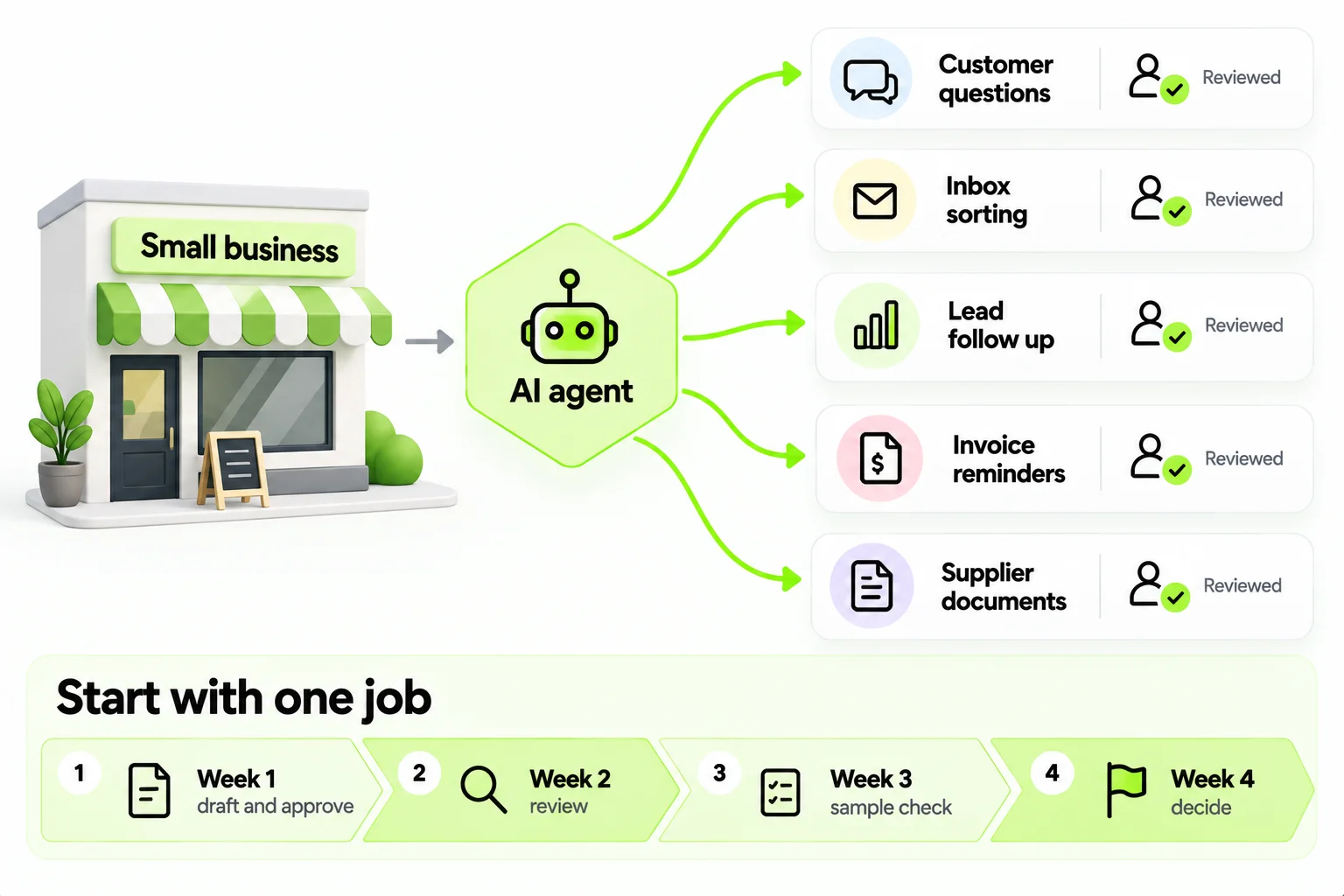
Many guides to AI agents for small business borrow enterprise assumptions, such as a platform team and a governance board. A firm of ten people has neither, and needs to know what to try on Monday.
AI agents for small businesses are useful for narrow, repetitive jobs where a mistake is cheap and a person can check the work. They are a poor fit for anything that needs real judgment about a relationship or a large amount of money.
What an AI agent is, in small business terms
An AI agent is software that reads something, decides the next step and does it inside your tools. It might read an incoming email, work out that it is a quote request, look up the customer in your CRM, draft a reply and put the draft in front of you.
AI agents for business automation do more than a basic chatbot, which answers questions and stops there, and more than automation that repeats the same steps every time. An agent copes with variation, such as a differently worded email or an unusual attachment, because it reads the situation each time. In return it can be wrong, so the first jobs you give it should be ones where being wrong costs little. (Our post on what is an agentic workflow goes into the difference from fixed rule automation.)
Jobs that suit an agent first
The best first jobs are repetitive, have a clear definition of done, and keep a person in the loop for anything unusual.
| Job | What the agent does | What a person still does | If it gets it wrong |
|---|---|---|---|
| Answering common customer questions | Replies from your own policies and product pages, with the source shown | Takes the questions it cannot answer | A customer gets an out of date answer because a policy page was stale |
| Sorting the shared inbox | Reads each email, tags it and routes it to the right person | Answers the emails that need a person | A complaint sits in the wrong queue for a day |
| Following up on leads | Replies to new inquiries quickly, asks a few qualifying questions and routes the lead | Takes the call | A good lead gets a generic reply |
| Chasing late invoices and quotes | Sends reminders on a schedule and logs the replies | Handles disputes | A reminder goes to a customer who has already paid |
| Comparing supplier quotes | Reads the quotes that come back and lines them up for comparison | Chooses the supplier | A price is read from the wrong line |
| Booking and rescheduling | Proposes slots and confirms appointments | Handles special cases | A double booking |
Several of these map onto things we build. An AI chatbot for business answers customer questions from your own documents and passes the rest to a person. CRM automation keeps lead records current and routes each follow up to the right person. The procurement agent reads incoming purchase requests and lines up supplier quotes for comparison.
Two worked examples
Both of these are invented, and both are small on purpose.
The first is a six person electrical contractor. The shared inbox gets about forty emails a day: quote requests, appointment changes, supplier invoices and the occasional emergency. The owner spends an hour a day sorting them. The first agent reads each email, tags it (quote request, reschedule, invoice, urgent, other) and routes it to the person who handles that tag, with a one line summary on top. A person still answers everything. In the pilot the owner reviews every tag for a week, finds that "reschedule" and "quote request" get confused when a customer asks for both, adds a rule to split those cases, and by week four is checking a sample of the tags. The hour a day becomes about fifteen minutes. The agent never sends anything to a customer.
The second is a boutique online shop with a two person team. Customers ask the same questions about delivery times, sizing and returns. The agent answers from the shop's own policy page and size guides and cites the page it used. It may answer the common questions and say "I'll ask the team" for anything else, which creates a task. It can't promise delivery dates beyond what the shipping page says, can't offer refunds, and hands any message containing "complaint", "damaged" or "lawyer" to a person at once. For the first two weeks a team member taps approve on every reply. After that, replies to a short list of question types go out automatically and the rest are still approved. The surprise is how many questions turn out not to be on the policy page, which gets rewritten twice.
Jobs to skip for now
Skip anything where one mistake is expensive and hard to reverse: sending payments, signing or editing contracts, or letting an agent make hiring decisions. If nobody on your team can describe a task, you can't test it, so leave that one alone. Rare tasks are a poor bet as well, since the setup seldom pays back.
What about your best customers? Those customers expect a person to be paying attention, so keep the conversation with a person. An agent can still prepare for it by summarizing the history or drafting talking points.
How to pick and pilot your first one
Multiply how often the job happens by how long it takes. If your team spends five hours a week sorting the inbox and a mistake there is cheap, that is a candidate. Decide what done looks like and what the agent should do when it is unsure. Without the second, the agent guesses.
Start with one AI agent for small business use and add a second only after the first has run for a month. Run it as a pilot of four weeks, with a person approving everything at the start, and track time saved, mistakes caught in review and cases the agent passed to a person. If mistakes are rare and cheap after the first few dozen cases, let it act on its own for the simplest ones and keep reviewing a sample. If they aren't, change the rules or pick a different job. (Mapping the job before you start, and measuring it afterwards, is covered in how to automate business processes.)
A pilot plan, week by week
The four week pilot for the inbox example could run like this.
Before week one, write the brief: the job, what done looks like, what the agent may and may not do, and who reviews. Spend an hour reading twenty recent emails so the brief reflects real traffic, and note how long the inbox takes in a normal week.
In week one the agent drafts and a person approves everything. Expect rough output; use the week to learn which kinds of email it handles badly, and keep a list.
In week two, fix the top three failure types, usually by sharpening the instructions or adding examples, and keep reviewing everything. Start timing how long a review takes, because review time is the number that decides whether this saves anything.
In week three, let the agent handle the simplest class on its own, such as routing new inquiries to the right person, while you keep reviewing the rest and sampling the simple class each day.
In week four, measure. Compare time spent on the inbox with the normal week you noted at the start, count the mistakes you caught and the ones your daily samples found, and decide: widen it, change it or stop. If it saves less time than it costs to supervise, you have learned that for roughly ten hours of one person's time.
Writing the instructions
The instructions are the part of an agent a small business owner can shape directly, and they deserve an hour. Write them as a one page brief. Say who the agent is working for and what it is for. List what it may do alone, what needs a person, and what it must never do. Describe your tone with two or three example replies you're proud of. Say what to do when it isn't sure, which should always be to hand over with a note. List the facts it must get right, such as opening hours, delivery times and the returns window, and say where the authoritative version lives. Keep the brief in a document the owner can edit, date each change, and read it again whenever something in the business changes.
Specific rules test better than general ones. Two lines from the shop's brief might read: "Answer delivery questions only from the shipping page; if the customer wants a specific date, quote the page's range and offer to ask the team." And: "Never offer a refund, a discount or an exception; create a task for the owner and tell the customer someone will reply within one working day." A line like "be helpful and professional" tells the agent very little, and you can't check whether it was followed.
Custom or off the shelf
For a small business the answer is nearly always to start with what exists. Many tools you already pay for, such as your email, CRM, helpdesk or accounting software, now have AI built in for drafting, summarizing, tagging and routing. A product that handles the job is faster to start and cheaper to maintain than a custom build, and one you already pay for and have connected to your data makes the cheapest pilot.
Custom AI agents for business make sense when your process is unusual enough that no product covers it, or when volume or data constraints make a custom build cheaper to run. Our post on custom AI agent development explains how to decide and what to ask a builder if you go that way.
Questions to ask before you sign up
If you buy a product or hire a builder, a few questions separate the serious proposals from the vague ones. Where does my data go, and does the provider keep it or train on it? Can I read a log of what the agent did and why? Can I switch it off in a minute? What can it reach in my systems, and can I narrow that? What does the bill look like if volume doubles? If I leave, what do I take with me: my instructions, my data, my history? A clear answer, including "we don't do that", is a good sign.
What it costs to run
Four costs add up.
- The software subscription for the tool or platform.
- Usage charges, since AI models bill for the amount of text they process and a busy agent costs more than a quiet one.
- Setup: the hours spent connecting the agent to your systems and writing down your rules.
- Review time, which is easy to leave out. Every output a person checks takes some of their time, and in the early months it can outweigh everything else.
A rough way to judge it: multiply tasks per month by the minutes saved per task, subtract the review minutes, value the rest at an hourly rate, and compare that with the software and setup costs. If the answer is small, pick a bigger job.
What the first month takes in time
For the inbox example, budget two hours to write the brief and read sample emails, an hour or two a week for review and fixes, and a couple of hours at the end to measure and decide. That comes to roughly ten hours of one person's month, so check before you start that someone has them. A pilot nobody has time for drifts, and its results mean little.
Working safely with customer data
Small firms often carry the same obligations as large ones, with fewer people to look after them.
Know what you're putting in. Customer names, addresses, order details and payment information are personal data, and you should know where they go. Don't paste customer data into a free consumer tool whose terms you haven't read. For any product an agent runs on, check what the provider keeps, for how long, and whether it uses your data to train models. Give the agent its own account with the least access that works, so a mistake or a hijacked instruction can't reach more than it should, and never give it payment credentials. Keep a log of what it did, so you can answer a customer or a regulator who asks. Decide how long logs and drafts are kept, because the answer shouldn't be forever. If a data protection law such as the GDPR applies to you, ask an adviser which parts do before you start, since a complaint comes too late.
Talking to your team about it
People who hear about an agent secondhand tend to assume the worst, so tell your team yourself. Tell them what the first agent does, which part of their job it touches, and what stays theirs. Ask them to try to break it: the person who sorts the inbox knows the strange emails better than you do. Make one person the owner, with a bit of paid time to read what the agent did and fix its instructions. And be clear about what you want in return for the time saved. If the answer is "we'll take on more work", say so. If it's "we'll stop working evenings", say that.
Signs the agent isn't working
Some signs are obvious: mistakes reach customers, or review time grows instead of shrinking. Others are easier to miss. The team stops checking the log because it's always fine. Nobody can say who last changed the instructions. The agent's tone drifts away from yours. A new product or policy launched and nobody told the agent. Customers start asking for a person more often. Any of these is a prompt to stop and look: read twenty recent outputs, compare them with the instructions, and update whatever has moved.
The first bad day
Sooner or later the agent will get something wrong in front of a customer, and it helps to have a plan before it does. Fix the case first: apologize as you would for a human mistake, and correct whatever was affected. Then find the cause. Common causes are unclear instructions, a fact that was out of date, a case nobody expected, or the agent simply misreading the message. Change the instruction or the source, and add the case to a short list of tricky examples that you run again after every change, and tell the team what happened and what changed.
After the first agent works
Once one agent has run for a month and the numbers hold, pick the second job the same way you picked the first. Good candidates sit next to it: appointment reminders, review requests after a purchase, a weekly summary of inquiries and sales, or the supplier quote comparison from the table above. Add agents one at a time. Each new agent is another set of instructions to maintain and another log to read, and a small team has limited time for both.
Mistakes small teams make
- Automating a messy process. The agent copies the mess faster, so write the steps down before choosing a tool, and if you cannot, fix the process first.
- Giving the agent too much access. Where you can, make its access read only, so one bad decision cannot reach your whole mailbox or your bank.
- Skipping the baseline. Time the job by hand for a week first, or you cannot show what changed.
If you want help choosing a first job, our work on AI agents for business starts from the workflow, and agentic workflow design sets the limits on what an agent may decide. To talk one through, get in touch.
Topics
- AI agents for small business
- Small business automation
- AI agents
- Business automation
- Customer support automation
- AI adoption
Frequently asked questions

Get started
Stop paying people to do what an agent can
Tell us what you want to automate. We will map the workflow, deploy the right agents, and train your team to run them.
- Every agent is trained on your own workflows, never a generic template
- Most deployments are live within two to four weeks
- SOC 2 compliant, with a complete audit trail on every deployment