
What is an agentic workflow, and how is it different from RPA?
What is an agentic workflow? A plain explanation, a side by side comparison with RPA, and how to build one an agent can run safely.
Sufi Inam Ul Hassan
AI Engineer14 minute read
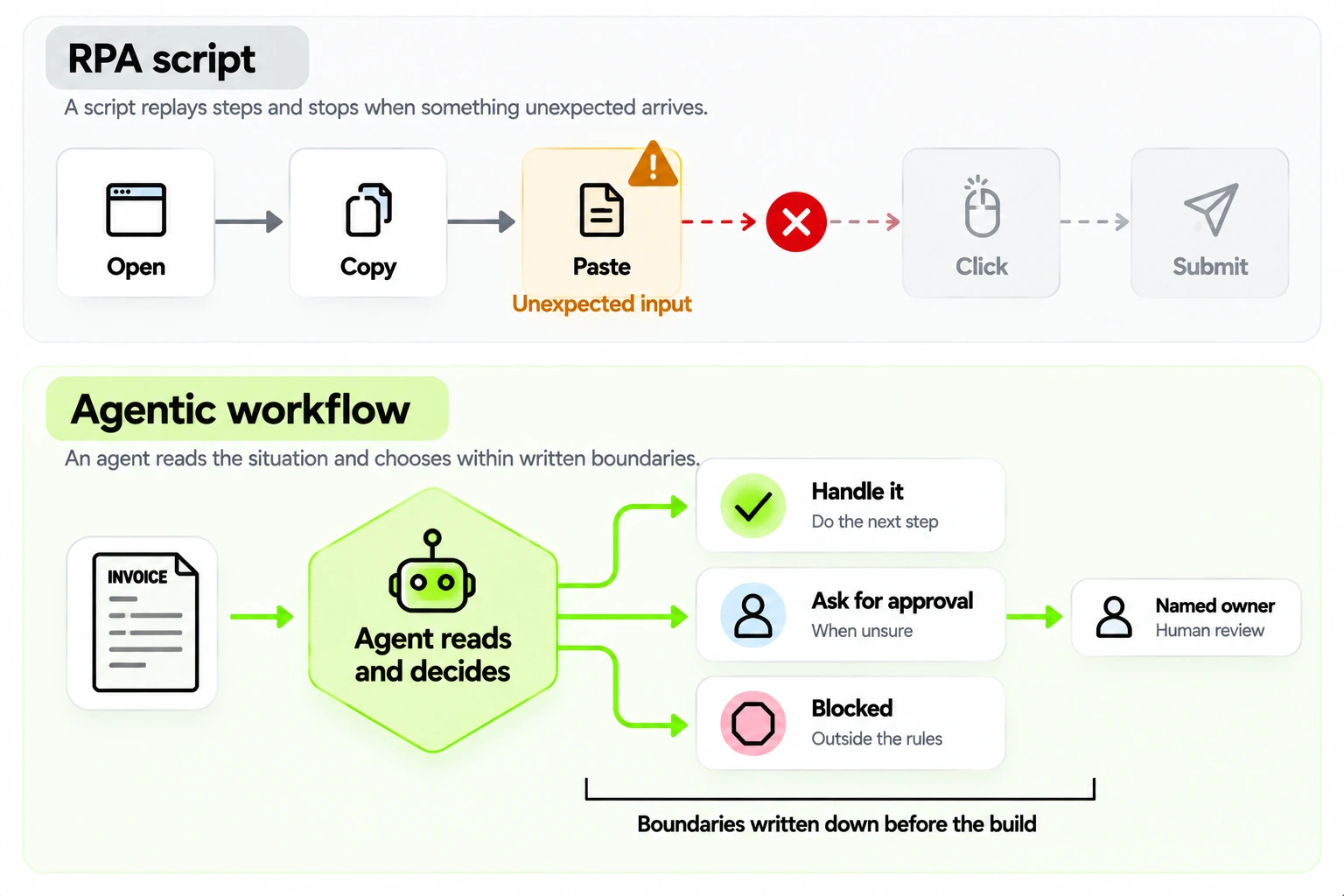
An RPA bot opens an invoice, copies the total into a form and clicks submit, the same way every time, until the day an invoice arrives as a phone photo with a handwritten correction on it. Then the bot stops, or worse, it copies the wrong number. An agent in the same situation reads the photo, notices the correction, decides what to do with it, and either handles the invoice or sends it to a person with a note explaining what it found. It will sometimes misread the handwriting, which is why its decisions are logged and reviewed.
That difference, between replaying steps and choosing the next one, is the short answer to the question "what is an agentic workflow?" The longer answer is mostly about boundaries: what the agent may decide alone, where it has to stop, who picks the work up when it does, and how all this differs from RPA or a chatbot.
What an agentic workflow is
An agentic workflow is a process in which an AI agent chooses the next step. Instead of following a fixed script, the agent reads the situation, picks from the tools and actions it has been given, does something, looks at the result and decides what comes next. It keeps going until the job is done or it reaches a point where it has to hand over to a person.
It needs a goal, tools and boundaries. The goal might be settling an invoice or answering a customer. The tools are whatever the agent may use: an inbox, a database, an ERP. The boundaries are written limits on what it may do alone, and an agent with no written boundaries is an experiment.
We sort the agentic AI workflows we design into four shapes: read and route, research and summarize, draft and check, and act and verify. A supplier email arrives and the agent works out which purchase order it concerns (read and route); it pulls three sources together into a brief before a meeting (research and summarize); it writes a reply and tests it against policy before anyone sees it (draft and check); it updates a record and then confirms the update took (act and verify). Most real workflows combine two or three of these.
Agentic workflow versus RPA
Robotic process automation records or scripts the actions a person takes on a screen and replays them. It's deterministic: given the same inputs it does the same thing, which is its great strength. It's also brittle. A button moves, a field is renamed, an input arrives in an unexpected format, and the bot fails.
When you weigh AI agents vs RPA for business automation, start with the input, because each suits a different kind of work.
| Compared on | RPA or rule based automation | Agentic workflow |
|---|---|---|
| Inputs | Structured and predictable | Messy and varied: emails, scans, free text |
| Decisions | Fixed rules written in advance | Judgment inside written boundaries |
| When it meets something new | Stops, or does the wrong thing silently | Chooses a path or escalates with context, and sometimes chooses wrong |
| Cost per run | Very low | Higher, because a model runs each time |
| Behavior | The same every time | Can vary between runs |
| How you audit it | The script is the record | You need a decision log |
| What breaks it | Interface and format changes | Vague boundaries and weak testing |
| Best for | High volume work that is stable and clean | Variable work that needs reading and judgment |
If a rule covers the decision, use the rule. It's cheaper, more predictable and easier to audit than an agent, and its logic is easy to explain. An agent earns its place where the inputs vary too much for rules and the decisions need reading or judgment. Plenty of processes end up using both: rules for the clean majority of cases and an agent for the awkward remainder.
How it differs from a chatbot
A chatbot on a shop's website tells you the return window; it leaves the next step to a person. An agent working the same request can take that step: create the ticket, update the record, send the quote, book the meeting. Because an agent acts, it needs boundaries, approval steps and logs in a way that a question answering bot doesn't, and the two combine well, with a chatbot as the part that talks to customers and an agent working behind it.
Decide what the agent decides
Before any code is written, mark each decision in the process one of three ways: the agent decides alone, the agent proposes and a person approves, or the agent must never do it.
Thresholds are the usual place to start. An agent might approve small amounts alone, send larger ones to a person, and never touch certain actions at all, because a wrong call on a small, routine amount is cheap to reverse. Whatever numbers you choose, write them down, get the process owner to agree to them, and enforce them in the system so the agent can't talk its way past them. The returns example below shows these limits in use.
Name an owner for escalations. When the agent reaches something outside its boundary, a specific person picks it up, with the context the agent had, so the work doesn't restart from zero. Without a named owner, escalations pile up in a queue that everyone assumes somebody else is watching.
Choosing the first workflow
Not every process makes a good first agentic workflow. Pick one with enough volume that the saving shows up, a clear definition of a good outcome, and mistakes that are cheap to fix. The tools the agent needs should already have APIs or a mailbox it can use, the people who do the work today should be willing to review its output, and there should be one named owner. Returns, order status questions, invoice matching and appointment scheduling tend to qualify. Pricing decisions, hiring decisions and anything that moves large sums of money without review don't, yet. If you're deciding between candidates, our AI readiness assessment framework scores them on points like these.
A worked example: a returns workflow
Follow one workflow end to end, using an invented online retailer. A customer emails to return a jacket. The workflow has seven decisions, and writing them down is most of the design work.
The agent reads the email and finds the order. That's a read and route decision with a clear rule: if it can't match the email to exactly one order, it asks the customer for the order number and stops. It checks the return window. Inside it, the agent continues; outside it, the case goes to a person, because an exception to the window is a judgment about the customer relationship. It checks the item category, since some categories (underwear, say, or customized items) can't be returned at all, and those get a polite refusal drafted for a person to send. If the customer says the jacket arrived damaged, the agent asks for photos before doing anything else, and a person reviews them.
For a plain return inside the window, the agent creates the return label and drafts the reply. Refunds under a set amount are approved automatically once the item is scanned in at the warehouse, and refunds over it wait for a person. At the end the agent updates the order record and writes the log entry: what it read, which rule it applied, what it did, and which version of the workflow did it.
Three things set this workflow apart from a script. The agent copes with variety in the email, such as different wording, partial information or a photo of the receipt. It stops at defined points and says what it needs. And every decision has an owner: the agent for routine cases, a named support lead for exceptions, and a person, never the agent, for the blocked list, which includes changing a customer's address after dispatch and anything involving a chargeback.
One agent or several
A common design question is whether one agent should do everything or several should divide the work. One agent with a few tools is simpler to build, test and debug, and for a narrow workflow like returns it's the right start. Splitting makes sense when the pieces need different tools or permissions (an agent that reads email shouldn't also hold the credentials for the payment system), when different parts benefit from different models (a small fast one for routing, a stronger one for drafting), or when a step is a separate job with its own owner, like fraud checks.
Every split adds a handoff, and handoffs are where context gets lost. If one agent classifies a case and another resolves it, the second needs the first one's reasoning as well as its label. Give the agents a shared case record to read from and write to, define exactly what each one hands over, and test each handoff on its own. And resist adding agents because the diagram looks impressive, since each one is another place to fail and another prompt to maintain.
What the agent should remember
Giving an agent memory is a design choice with risks of its own. An agent needs enough context to do the current case well: the case record, the relevant policy, and whatever it already did on this case. It rarely needs a long memory of other customers' cases, and carrying one around raises privacy questions and makes behavior harder to predict.
Keep three kinds of context apart. The case state belongs in your own system, outside the model's context window, so a restart or a handover to a person doesn't lose it. Policy and reference material should be retrieved when needed and cited, so that changing a policy changes the behavior without retraining anything. And anything the agent learns from outcomes, such as which kinds of emails tend to need a person, should go through a human review before it changes the rules. An agent that rewrites its own instructions from experience, silently, has stopped being something you can audit.
How to build agentic workflows
- Map the process and mark every point where a decision is made, as opposed to a step being carried out.
- Assign each decision: agent alone, agent with approval, or blocked.
- Choose the tools the agent needs and give it the narrowest access that works: its own account, and access that can only read wherever possible.
- Build to the boundary. That means orchestration across steps and systems, shared context so each step knows what the last one did, and retry logic for the failures that messy data produces.
- Test on real cases, including ones the agent should refuse. Passing only the easy cases proves very little.
- Run a trial with a person reviewing every output, and widen autonomy only on the steps where the agent's calls matched the human's.
- Go live with monitoring: what is running, what is waiting, what stopped, and how often the boundary was hit.
Step five is the easiest to skip and the one most likely to find problems.
When to give an agent more autonomy
Autonomy should widen on evidence, one step at a time. A reasonable rule is to let the agent act alone on one class of case once its decisions have matched a person's across enough cases to be unremarkable (a few hundred, if the volume allows) and its wrong action rate sits under a ceiling you set in advance. Widen to the next class only after the first has held for a few weeks. Keep a sample of autonomous decisions going to review indefinitely, because quality drifts when nobody is looking. And write down the conditions that pull autonomy back: a rising wrong action rate, a change in the process, a new model version. Permissions that only ever grow are a warning sign in themselves.
Cost and latency
Two unglamorous constraints shape a lot of designs. The first is cost per case. Every model call has a price, and a workflow that makes several calls per case (read the email, classify it, check policy, draft the reply, review the draft) multiplies it. Say a call costs a fraction of a cent on a small model and several cents on a large one; across fifty thousand cases a month the gap runs to thousands of dollars. (These figures are illustrative, so check current prices.) Use a small model for routing and extraction, reserve the large one for the steps that need it, and cache what repeats, such as the policy text.
The second is latency. A customer waiting in a chat window won't tolerate a minute of silence, while an overnight batch of invoices doesn't care. Decide which kind of workflow you're building before choosing the architecture. For slow steps, show progress or give the customer a reference and a promise. And set timeouts everywhere, because a tool that hangs shouldn't freeze the case: after a set time the workflow should retry once and then escalate with a note saying what failed.
Testing what happens when things fail
Most testing checks that the workflow does the right thing when everything works. The more revealing tests make things fail on purpose. Take the inventory system offline in a test environment and see what the agent does when it can't confirm stock. Feed it an email with two orders and an angry tone, or a photo that isn't a receipt. Make a tool return an error, then a slow response, then a plausible wrong answer. Send ten times the usual volume and watch the queue and the cost.
For each failure, decide what the right behavior is before you run the test: retry, escalate, refuse or ask. Then check that the log explains what happened in words a support lead can read. A workflow that fails safely and says so is more trustworthy than one that handled the happy path perfectly and has never been tried on a bad day.
Where agentic workflows go wrong
Watch for these:
- Boundaries written as "use good judgment", which is no boundary at all.
- Testing only the happy path.
- Context lost between systems, so the third step doesn't know what the first one found.
- No estimate of cost per run. Say a workflow calls a large model forty times for each case; at fifty thousand cases a month that is two million calls.
These are harder to fix when nobody can tell afterwards why the agent did what it did. A decision log records each decision, the information behind it and whether it stayed inside the boundary, and it lets you tell skill from luck. Without one you can't improve a decision, and you can't defend it when somebody asks.
Who looks after it after launch
A live workflow needs a person whose job it is to look after it. That person reads the weekly exception report, updates the policy text when a policy changes, and decides whether a new model version gets tested before it goes live. Without one, the workflow decays: a policy changes, the agent keeps applying the old one, and the first sign is a customer complaint. Name the role and give it a few hours a week.
How we approach it
We design AI agentic workflows starting from the decisions: what the agent decides alone, what it hands to a person, and what it must never do, all written down before anything is built. Oversight and accountability get more space in our post on AI agent governance in procurement, and the wider procurement picture is in agentic AI in procurement automation. If you're still choosing which process to start with, how to automate business processes covers mapping and measurement. To talk through a specific workflow, get in touch.
Topics
- Agentic workflows
- AI agents
- RPA
- Human in the loop
- Workflow design
- Agent orchestration
Frequently asked questions

Get started
Stop paying people to do what an agent can
Tell us what you want to automate. We will map the workflow, deploy the right agents, and train your team to run them.
- Every agent is trained on your own workflows, never a generic template
- Most deployments are live within two to four weeks
- SOC 2 compliant, with a complete audit trail on every deployment